Bitdefender 2020 Antivirus Solutions review

Please note
This is our all-in-one roundup reviewing every Bitdefender consumer security solution for 2020. On this page, after our brief intro, you’ll find
(a) a full evaluation of the entry-level Bitdefender Antivirus Plus 2020, along with our reviews of the additional features incorporated with the rest of the range:
(b) Bitdefender Internet Security 2020, and
(c) the top-end package Bitdefender Total Security 2020.
(d) Finally, at the end of the article is our review of the free offering, Bitdefender Antivirus Free Edition.
You can jump to the reviews of those individual products by clicking on the links, but bear in mind that this article is really designed to be read all the way through, as the features of Antivirus Plus 2020 are also present in the higher-level security suites, of course.
Bitdefender 2020 is the Romanian firm’s latest power-packed family of top-of-the-range antivirus and security suites.
The consumer range starts with Bitdefender Antivirus Free Edition, a simple Windows tool which focuses very much on the core security basics: antivirus, blocking of phishing and other scam sites, and that’s about it.
a massive 60% discount on Antivirus Plus (or click here for a 50% discount if you’re in Australia). That means the price comes down to just $23.99 (around £18) or AU$35 for the year for three devices!

Bitdefender Internet Security extends the package with a firewall, spam filter and parental controls. Webcam protection enables blocking unauthorized access to your webcam, and a new microphone monitor shows you which apps are accessing your microphone. $40 gets you a three-device, one-year license, rising to $80 on renewal.
At the top of the range, Bitdefender Total Security adds device clean-up and optimization tools, and introduces apps to cover Mac, Android and iOS devices, as well as Windows. That’s a major bonus, and it’s only marginally more expensive than Internet Security, at $45 for the first year ($90 on renewal) to cover up to five devices.
Some of these headline prices can look high, especially when there’s no introductory discount, but they’re generally good value in the long-term. Kaspersky Anti-Virus costs a low $120 to protect 5 devices for the first three years, for instance, but renews at $240. Bitdefender Antivirus Plus covers the same hardware for $150 from the beginning (even covering 10 devices costs only $180).
If you’re not yet convinced, no problem: every product has a 30-day trial build available. There are no credit card details required, just register with your email address and you can check out Bitdefender’s abilities for yourself.
Bitdefender Antivirus Plus 2020 is quick, simple and largely automatic. We pointed, we clicked, and within a couple of minutes a reassuring ‘Bitdefender is successfully installed’ message told us it was time to get started.
Browsing our system, we found the installer had added Bitdefender’s Anti-Tracker extension to Google Chrome, and Bitdefender Anti-Tracker and Wallet to Firefox. (Anti-Tracker also works in Internet Explorer and Safari, but there’s no support for Opera or Edge).
- Get Bitdefender Antivirus Plus 2020 for 60% off by clicking here if you live in the US or UK or alternatively click here for 50% off if you live in Australia!
Bitdefender had equipped our test system with plenty of new background processes, services, drivers and assorted other low-level clutter, too. That’s not unusual for an antivirus, but it can be a problem if it affects performance.
PassMark’s Consumer Security Products Performance Benchmarks 2020 Edition 2 report measured the PC performance impact of 15 top internet security products over 23 metrics. It’s just as thorough a test as it sounds, and the results weren’t good for Bitdefender, with the company ranking a next-to-bottom 14th place (Norton, Kaspersky and ESET came top).
Other tests are more generous. AV-Test’s Windows Home User report for December 2019 placed Bitdefender in the middle of the pack, while AV-Comparatives’ October 2019 Performance report ranked it 7th out of 16.
Our own checks showed mid-range results; it slowed down booting more than Trend Micro Antivirus, for instance, but boot times were more consistent than Avast. Overall, we suspect you won’t have any significant performance issues, but keep that poor PassMark score in mind anyway, and test the trial build carefully before you buy.
There was better news with our self-protection results, where we test security apps to see if malware can disable them. We tried closing processes, stopping services, unloading drivers, tweaking settings, and generally doing our best to break the package, but Bitdefender Antivirus Plus shrugged off our attacks and carried on as normal.

Interface
Launching Bitdefender Antivirus Plus for the first time fires up a simple tour highlighting key areas of the interface and explaining what they do. Experienced users will probably figure this out on their own, but it’s good to have this guidance available for those who need it.
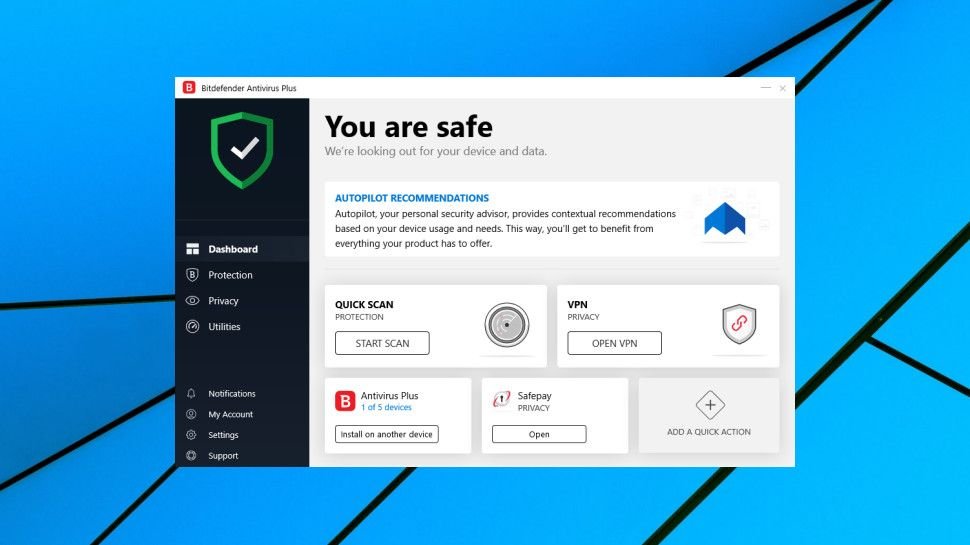
Bitdefender’s nicely designed dashboard gives you speedy access to the functions you’ll need most often, with Quick Scans and the VPN just one click away.
A left-hand sidebar organizes Bitdefender’s other tools into Protection, Privacy and Utilities areas, and tapping any of these lists the various functions they contain. Most of these are sensibly named, and if you’ve ever used another antivirus you’ll quickly find your way around, but tooltips are on hand if you need a hint.
If the standard dashboard layout doesn’t quite suit your needs, you can customize it to remove default features or add new ones. Not interested in the VPN, maybe? In a click or two you could replace it with links to the full system scan, the password manager, disk clean-up module or a host of other tools. If only everyone was this flexible.
Overall, Bitdefender Antivirus Plus offers a polished and professional interface which delivers in just about every area. It’s easy and comfortable to use for beginners, but also offers the configurability and control that experts need.

Antivirus
Bitdefender Antivirus Plus 2020 supports several scan modes. Quick Scan checks the most commonly infected areas, and System Scan examines everything. Furthermore, File Explorer integration enables scanning objects from Explorer’s right-click menu, and there’s a bootable rescue environment to assist in cleaning the most stubborn threats.
A Manage Scans tool lets you create new scan types to check specific files and folders, as well as configuring how the scan works, and setting it up to run on a schedule, or on-demand only. This works well enough, although it doesn’t begin to provide the expert-level options that we’ve seen from vendors like Avast and Avira. Unfortunately, you can’t pin your custom scan type to the main dashboard, either, so it’s always at least three clicks away.
Bitdefender’s antivirus settings can’t match the geek-level configurability of some of the competition, either, but they’re well-judged and focus on the functions you’re more likely to need.
You don’t get intimidating and overly technical options to scan RAR archives to a nested depth of 4, but not scan TARs, for instance – there’s just the usual ‘scan archives, yes or no?’ setting.
But in an unusual touch, you’re able to control whether Bitdefender scans incoming and outgoing emails, incoming only, outgoing only, or ignores emails entirely. That may well prove pretty useful.
Default scanning speeds are decent, with Quick Scans taking around 15-30 seconds on our test computer. Regular scans started a little slowly at 25 minutes to check 50GB of files, but this dropped to under six minutes on the second run, and by the third run the scan time was just 67 seconds.
The scanning engine is smart enough to handle simultaneous scans without difficulty, too. If you’re running a lengthy full system scan, for instance, you can still run an on-demand scan of a recent download, or anything else you like. A window pops up to display the results of your second scan, while the first scan continues to run in the background.
The total sum of this is a polished set of malware-hunting tools which go well beyond the basics, but remain easy to use for not-so-technical types. Experts might wish there were a few more fine-tuning options, but in general Bitdefender gets the configurability balance right.

Protection
Bitdefender has a great name for protection, and its products regularly top the charts with most of the big independent testing labs.
AV-Comparatives’ July to October 2019 Real-World Protection report showed Bitdefender performing very well. The engine blocked 99.7% of threats (that’s 701 out of 703, to put it in perspective), placing it fifth out of 16 for overall protection rate, just behind Avira, Symantec, Trend Micro, and VIPRE.
AV-Test’s Windows 10 tests for December 2019 highlighted even better detection results, with Bitdefender blocking 100% of test threats.
No individual reviewer can hope to compete with the testing labs for thoroughness, but we were keen to confirm their verdicts by seeing how Bitdefender Antivirus Plus handled a couple of ransomware threats.
The first, a real-world ransomware specimen, was eliminated almost immediately, with Bitdefender killing the process before it could cause any harm.
The second was a custom ransomware simulator of our own. It’s about as simple a malware sample as you could get, but it’s also something Bitdefender would never have seen before, allowing us to evaluate how Antivirus Plus performs when presented with brand new threats.
We ran our test software, and in just a fraction of a second, Bitdefender’s engine cut in and displayed an alert. Not only had it detected and killed our test process, but it successfully restored the handful of files our software had managed to encrypt (just five).

We had some small issues with threat handling. Our simulator executable wasn’t quarantined or even blocked from running, for instance. We were able to run it multiple times, and when we manually scanned it later, Bitdefender marked the simulator as ‘clean.’
The company told us that threats are removed only if they’re detected by the signature layer.
Be the first to write a comment.