Trend Micro 2020 Antivirus solutions review

Please note
This is our all-in-one roundup reviewing every Trend Micro consumer security solution for 2020. On this page, after our brief intro, you’ll find
(a) a full evaluation of the entry-level Trend Micro Antivirus+ Security, along with our reviews of the additional features incorporated with the rest of the range:
(b) Trend Micro Internet Security, and
(c) the top-end package Trend Micro Maximum Security
You can jump to the reviews of those individual products by clicking on the links in the bar at the top of this page, but bear in mind that this article is really designed to be read all the way through, as the features of Trend Micro Antivirus+ Security are also present in the higher-level security suites, of course.
Trend Micro’s consumer security range follows a very familiar pattern, with a single Windows-only antivirus product, a more powerful internet security suite, and a top-of-the-range product with extra functionality and support for Windows, Mac, Android and iOS devices.
The baseline Antivirus+ Security offers simple antivirus protection, antiphishing and malicious URL blocking, while Trend Micro’s Pay Guard aims to keep your banking transactions safe from snoopers.
You can sign up for Trend Micro’s antivirus solutions here
Trend Micro Internet Security protects up to three PCs and throws in parental controls, optimization for your social media privacy settings, and PC cleanup and maintenance.
The package is priced at $40 for year one, $80 on renewal, or you can pay $60 up-front for a two-year license, then $125 when you renew.
Again, this isn’t particularly expensive, but if you’re looking to protect more devices, you’ll find much better deals elsewhere.
Trend Micro Maximum Security covers up to five devices, which can now include Macs, Android and iOS devices, as well as PCs. Oh, and it adds a password manager, too.
Pricing is reasonable at $40 for the first year, $90 on renewal. The two-year subscription is better value than the rest of the range, too, at $60 for the first term (the same as Internet Security), $140 on renewal.
Trend Micro Antivirus+ Security

Getting started with Trend Micro Antivirus+ Security is generally easy. There’s a trial build available, installation is largely automatic, and you don’t even have to provide your email address to try it out. (You’re prompted to enter your email address at the end of the process to get product news and updates, but this is optional. We left the box blank and the installer didn’t complain.)
One potential issue we noticed is the installer’s sensitivity to ‘incompatible’ software. Trend Micro Antivirus+ Security refused to install until we removed Kaspersky’s Secure Connection VPN, for instance. It’s hard to see why, because although it’s a Kaspersky product, it has nothing to do with antivirus, and it really shouldn’t conflict with other security tools.
There’s another minor hassle with Trend Micro’s browser extensions. Antivirus+ Security didn’t install these for us, instead raising occasional pop-up alerts asking us to install the Chrome extension manually. The package could do more to help users out (the ‘install our Chrome addon’ alerts don’t even include a link.)
Once setup is complete, the package added an icon to our system tray but otherwise stayed mostly in the background. This is an antivirus which doesn’t get in your way, and most of the time you can forget it’s there.
The Trend Micro Antivirus+ Security installation grabbed more system resources than most, with more than 1GB of data and executable files, a further 2.65GB in an Installer folder, eight background processes and assorted other drivers.
The package had only an average performance impact on our review system, though, and other testing shows similar results.
For example, PassMark’s Consumer Security Products Performance Benchmarks for 2020 (Edition 2) checked 15 popular antivirus packages for their PC performance impact across 23 metrics. Trend Micro Antivirus+ Security wasn’t on the list, but PassMark did check Trend Micro Internet Security, and that managed only 10th place (1st place had the least impact on speed, 15th the most.)
We completed our initial checks by simulating the type of attacks malware might use to try and disable Trend Micro’s protection. We tried to delete files, kill processes, stop services, tweak settings, unload drivers and silently uninstall the package, but Trend Micro’s capable self-protection blocked even the sneakiest of tricks, and we remained fully protected at all times.
Interface
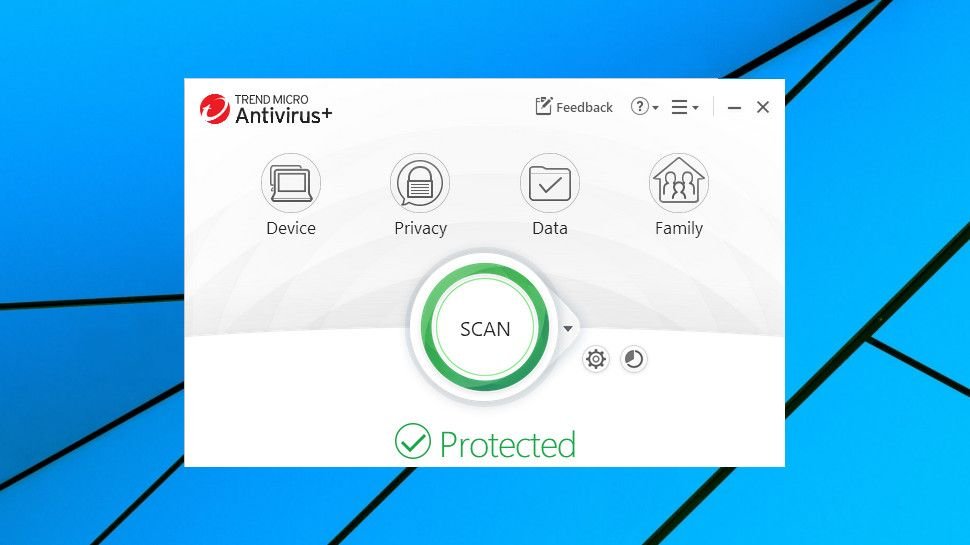
The interface has a friendly and appealing look. There are large animated icons, a big scan button, a clear description of your security status, along with text captions and tooltips to make it clear how everything works. You can even customize the console with a new background image.
Checking the Settings dialog revealed the same focus on clarity, with nothing too intimidating present. Instead of the usual technical jargon, options are spelled out in plain English, like “Prevent programs on portable drives from launching automatically” or “Check if programs try to make unauthorized changes to system settings which could threaten your security”.
Experts might wish for more low-level control, but if you’re normally left baffled by at least some antivirus settings, Trend Micro’s simplified approach could be a refreshing change.
Antivirus
Trend Micro Antivirus+ Security’s Scanning options are straightforward. You’re able to run quick, full or custom scans, where you can specify particular drives or folders to check. There’s very little control over any of this, and no Avast-like ability to add other scan types and define precisely how they work. But it’s easy to use, and if you’re not the type who normally delves deep into antivirus settings, you’ll probably be happy enough.
You’re able to scan files from their right-click Explorer menu, too, although with some restrictions. We noticed that Antivirus+ Security doesn’t support simultaneous scans, and the Explorer ‘Scan with Trend Micro’ option is greyed out when you’re running a scan from the main console.
That’s probably not something you’ll notice often, but it’s still a potential nuisance, and not an issue you’ll get with the best engineered antivirus (Kaspersky products are able to run multiple scans simultaneously, each in their own window.)
Scan times were a little below average in our tests, and we didn’t notice any ‘scan only new and changed files’-type optimization to improve performance. No matter how many times we scanned our 51MB of test data, it still took around 14 minutes.
Trend Micro’s protection doesn’t stop with real-time behavior monitoring and on-demand scanning. Folder Shield, an anti-ransomware layer, watches your Documents, OneDrive and Pictures folders, as well as any connected USB drives, and alerts you about any attempt to modify files by trusted processes. You can add more folders as necessary.
Folder Shield isn’t a new idea – Windows 10 now does something similar with its Controlled Folders feature – but it’s a welcome extra layer of protection which could block even brand-new undiscovered ransomware.
Protection
AV-Comparatives’ real-world protection test is a tough benchmark which pits 18 top antivirus engines against some of the very latest malware. Trend Micro’s results in the latest July-October 2019 summary report were very positive, with its test product blocking 99.9% of test threats, placing it third out of 16 contenders.
The package typically raised more false alarms than most of the competition, though, something we’ve also seen ourselves. Avira topped the AV-Comparatives list with just one false positive across all tests, for instance; Trend Micro had 19. That could translate into a lot of extra hassles during real-world use.
Checking the results from other labs revealed a mixed picture. AV-Test’s September-October Home Windows report showed Trend Micro blocking 100% of all test threats and raising only one false positive, against an industry average of four. But SE Labs October to December 2019 Home Anti-Malware Protection report placed Trend Micro ninth out of 15 with a protection rate of 98%.
To get a more complete idea of the program’s abilities, we tested the program with our own custom ransomware simulator. As we’ve written this ourselves, Trend Micro wouldn’t be able to detect the threat from its file signature, and could only rely on behavior monitoring. Many antivirus products have failed this test, but Trend Micro managed another big success. Not only did it kill the process after only a handful of files had been encrypted, but it also recovered those documents in full, ensuring we didn’t lose any data at all.
That puts Trend Micro alongside Bitdefender and Kaspersky as the only vendors with products that have both blocked our test threat and recovered any lost files. That isn’t necessarily the best result – some products have blocked our simulator before it can touch a single file – but the ability to restore damaged files does give us a little more confidence in an antivirus’ abilities.
URL filtering
Trend Micro Antivirus+ Security includes several levels of browsing protection.
Trend Micro’s Social Networking Protection uses browser extensions to display a ‘risk rating’ of links on popular social networks, for instance (Facebook, Twitter, LinkedIn, Pinterest, Weibo and more.) But there’s also automatic checking of URLs before they’re accessed, and even if a p
Be the first to write a comment.