Microsoft has just broken Windows 10’s antivirus protection – apply this fix straight away
Update: Microsoft has now fixed this issue. Users were reporting that Windows Defender was crashing when running a full scan. It appears the issue was caused when Windows Defender encountered a file with a name with two periods (..) in it. Microsoft has now released a new Security Intelligence Update for Windows Defender that fixes…
Update: Microsoft has now fixed this issue. Users were reporting that Windows Defender was crashing when running a full scan. It appears the issue was caused when Windows Defender encountered a file with a name with two periods (..) in it. Microsoft has now released a new Security Intelligence Update for Windows Defender that fixes this issue. The update should install automatically, but you can also manually install it by clicking ‘Check for updates’ in the Windows Security app.
Original story follows…
Windows 10.
As Windows Latest reports, it appears that an automatic update, known as Security Intelligence 1.313.1638.0, which was only recently released by Microsoft, is causing Windows Defender to show error messages saying “Threat service has stopped. Restart now,” and “Unexpected error. Sorry, we ran into a problem. Please try again.”
How to fix Windows 10 search problems
We solve 100 common Windows 10 problems
Buy Windows 10: the cheapest prices in April 2020
Most worryingly of all, the issues appear to prevent users from being able to run Windows Defender scans to check Windows 10 for viruses and security problems.
Indefensible
Microsoft is having a rough time of late when it comes to pushing faulty updates, but this is one of the most concerning. Because Windows Defender is built into Windows 10, it’s used by a huge amount of people to keep their PCs safe when online.
If the update is causing Windows Defender to stop working, millions of PCs could be at risk.
McAfee Internet…McAfee Internet Security 2017 – 3 Device
$3
View
at
Amazon
Bitdefender Mobile Security…
Bitdefender…Bitdefender Mobile Security 2020 1 Device 1 Year
$14.99
View
at
Office Depot
McAfee Internet Security – 3…
McAfee Internet…McAfee Internet Security – 3 Devices / 1 Year
$24.99
View
at
Newegg
ESET NOD32 Antivirus 2017 1…
ESET NOD32…ESET NOD32 Antivirus 2017 1 User for Windows (1 User) [Download]
If you’re relying on Windows Defender to protect your PC, and you’re unable to get it to run, then you’ll be understandably keen to fix this issue as soon as possible.
It seems you can’t just uninstall the update to get it to work. However, Windows Latest reports that if you perform a System Restore to a date before you installed the update, that should fix the issue.
To do this, type ‘System Restore’ into the search box of the taskbar. Click ‘Create a restore point’, then in the window that appears, select ‘System Restore’.
Click ‘Next’, then choose a restore point from the list. There should be a Restore Point from a date earlier than April 16, which is when the update was released.
Before you click ‘Next’ to move on, it’s a good idea to click ‘Scan for affected programs’ to see what (if any) programs will not be installed if you use this restore point. Once you’ve done that, click ‘Close’, then ‘Next’, then ‘Finish’ to confirm you want to restore this particular point.
Check out our guide on how to use System Restore for more information.
Visit our best anti-virus guide for alternatives to Windows Defender
If you’re looking for a comprehensive online security suite for your family that also includes parental controls, Bitdefender is one of the best options right now. It’s a well-known security provider offering an award-winning antivirus program, along with a password manager, VPN, and identity theft protection. But does its parental control offering, which is bundled
Published
4 weeks ago
in
By
If you’re looking for a comprehensive online security suite for your family that also includes parental controls, Bitdefender is one of the best options right now. It’s a well-known security provider offering an award-winning antivirus program, along with a password manager, VPN, and identity theft protection.
But does its parental control offering, which is bundled with its Family plans and not available via a standalone subscription or even a dedicated app, compete against the best parental control apps?
Read on as we dissect the various parental control features it offers, what they cost, how easy the dashboard is to use every day, and what the top competitors offer.
Bitdefender Premium Security Family subscription options:
$99.99/year at Bitdefender
Bitdefender parental control review: Plans and pricing
Bitdefender no longer offers its parental control features as a standalone subscription. You’d have to get one of its four family plans. But note that its entire suite of parental control features is available with each of these four plans.
The Total Security Family plan starts at $79.99 for the first year and covers up to 25 devices across five family members. At this price, the cost boils down to around $16 per member per year, which is more affordable than many other parental control applications. Not to forget that, for the price, you also get 24/7 real-time antivirus protection for up to 25 devices, as well as a password manager.
(Image credit: Bitdefender)
Next is the Premium Security Plan, which costs $99.99 for the first year and also comes with scam protection, AI-based scam protection, and a VPN with 4,000+ servers in 50+ countries. The Ultimate Security Family Plan and the Ultimate Security Plus Family Plan cost $119.99 and $199.99 for the first year, respectively.
The former comes with dark web monitoring and identity theft protection features such as an identity protection score and real-time breach notifications, while the latter also includes $2 million in identity theft insurance, three-bureau credit monitoring, and other bank, credit card, and investment alerts.
Are you a pro? Subscribe to our newsletter
Sign up to the TechRadar Pro newsletter to get all the top news, opinion, features and guidance your business needs to succeed!
Bitdefender parental control review: Features
One of the standout Bitdefender parental control features is the ability to set screen-time schedules for your children, who would only be able to access their devices during the allowed time intervals.
Along with this, Bitdefender also offers several preset routines: Focus Time, Family Time, and Bedtime, which you can customize as per your child’s daily activity and schedule.
(Image credit: Bitdefender)
There’s also a pretty handy internet time management feature, which allows you to control how much time your child spends on the internet during a day. A nice addition is the ability to reward extra screen time for your children for responsible online use.
In addition to internet scheduling, parents can also choose to cut off internet access directly on their child’s device using Bitdefender’s Stop Internet feature.
(Image credit: Bitdefender)
Bitdefender also offers predefined age-appropriate filtering categories to help you filter out inappropriate content such as porn, betting, or online gaming for your children. As with screen time, you can also fine-tune these filters to better suit your child’s day-to-day use.
Apart from category-level filtering, parents can also allowlist or blocklist specific URLs individually, in case you want to go beyond the category selection.
(Image credit: Bitdefender)
Parents can set up to five child profiles, each with the child’s name, photo, and birth date. Bitdefender automatically applies age-appropriate filtering as soon as the profile is created, which parents can then edit as per their needs.
Along with this, there’s also location tracking, which helps you know where your child is on an interactive map at all times.
(Image credit: Bitdefender)
Lastly, there’s Safe Search, which lets you remove explicit and harmful results from search engines, as well as YouTube restrictions, which ensure your child only views age-appropriate videos on the platform.
However, note that content filtering and safe browsing require an active VPN connection to function, as per Bitdefender’s listing on the Google Play Store.
Bitdefender parental control review: Interface and in-use
Bitdefender parental control works across Android, Windows, iOS, and macOS. That said, Windows and Android get full, unrestricted enforcement of every feature, whereas macOS and iOS are noticeably more limited, largely due to Apple’s own platform restrictions.
For instance, iOS content filtering runs through Apple’s Screen Time and not Bitdefender’s own engine. Parents have to create a child account through Apple ID, then Bitdefender’s app hooks into Apple’s Screen Time restrictions rather than doing its own independent content filtering.
However, the setup is pretty simple. You just have to download the app on your child’s own device. Unlike other parental control applications, you can’t download the app on your child’s phone remotely – you’ll need physical access to the device to do so.
One thing worth noticing is that, after the 2025 overhaul, parental control is no longer configured within the Bitdefender Central mobile app, but from the Bitdefender Central web dashboard, which can still be accessed through the mobile application.
(Image credit: Bitdefender)
Once you’re on this dashboard, day-to-day use is genuinely easy. Bitdefender’s Activity Dashboard is filled with several graphs and charts, which allow you to check your child’s phone activity at just a glance.
For example, there’s a bar chart showing their daily internet time over the past few days, as well as a pie chart showing their current day’s internet usage along with their remaining time. The dashboard also gives parents visibility into what’s actually being blocked and when.
(Image credit: Bitdefender)
The Prevented Content Access panel is a running log of every link blocked on the child’s device over the past 7 or 30 days. This allows you to see whether your filtering settings are actually able to catch anything, or whether your child is repeatedly trying to search for restricted websites on their device.
You can pay every month for Office 365’s productivity tools, but you still can’t escape Microsoft Defender’s habit of turning everyday links into fake security alerts. On September 2, Office 365 subscribers ran into an unusual incident: Redmond’s endpoint antivirus engine began flagging Google Search results as potentially malicious URLs.Read Entire Article…
Published
1 month ago
in
By
You can pay every month for Office 365’s productivity tools, but you still can’t escape Microsoft Defender’s habit of turning everyday links into fake security alerts. On September 2, Office 365 subscribers ran into an unusual incident: Redmond’s endpoint antivirus engine began flagging Google Search results as potentially malicious URLs.Read Entire Article… Read More
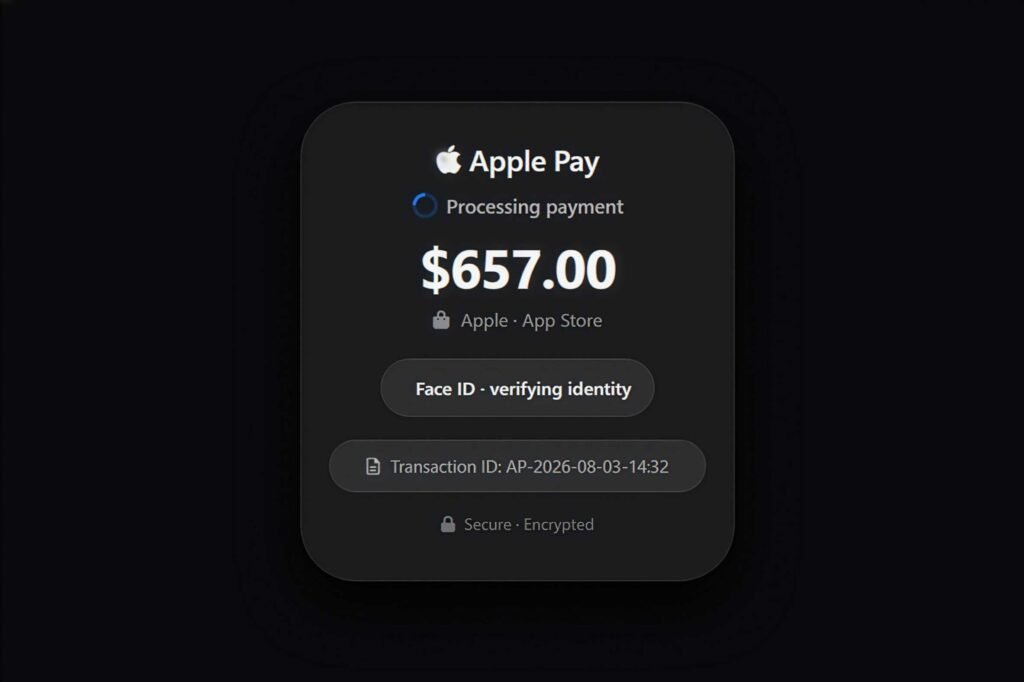
Macworld The security, antivirus, and VPN company Malwarebytes has an interesting post on its Malwarebytes Labs blog detailing a new and sophisticated scam. The web-based trick is meant to make users think that they just made a big payment with Apple Pay, with the goal being to trick them into calling a fake “Apple Support”
Published
1 month ago
in
By
Macworld
The security, antivirus, and VPN company Malwarebytes has an interesting post on its Malwarebytes Labs blog detailing a new and sophisticated scam.
The web-based trick is meant to make users think that they just made a big payment with Apple Pay, with the goal being to trick them into calling a fake “Apple Support” number… Read More