Microsoft

Microsoft Surface Duo review: Is this the new normal?

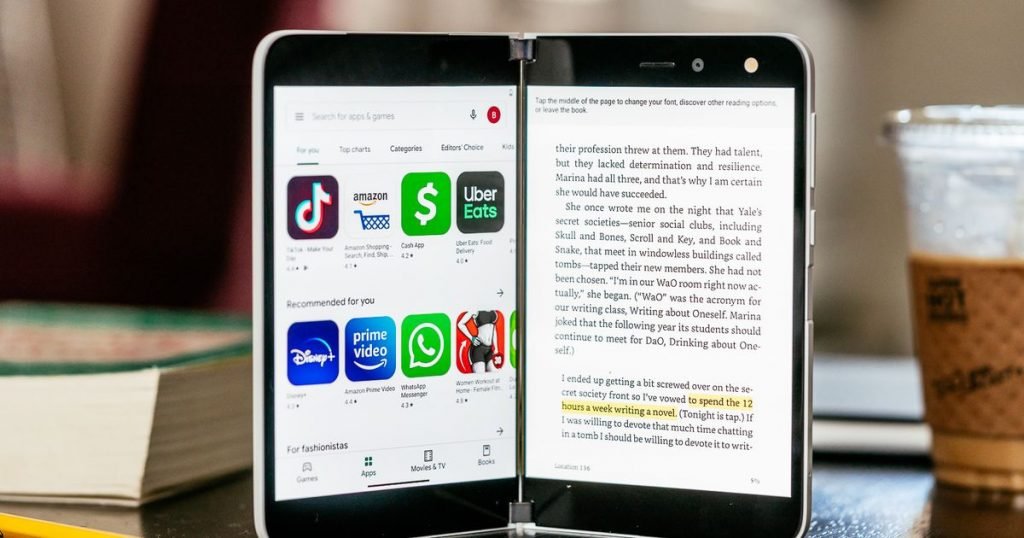
Microsoft Surface Duo $1,399 View Product The Good Gorgeous design • Super lightweight and thin • Flexible and sturdy hinge • Compose / tent / book postures add versatility The Bad Buggy • Lack of a front-facing notification panel • Lack of water resistance • Steep navigation learning curve • Hard to control one-handed The…

Microsoft Surface Duo
$1,399

View Product

The Good

Gorgeous design • Super lightweight and thin • Flexible and sturdy hinge • Compose / tent / book postures add versatility

The Bad

Buggy • Lack of a front-facing notification panel • Lack of water resistance • Steep navigation learning curve • Hard to control one-handed

The Bottom Line

The Surface Duo is a right step in a different direction for Microsoft’s mobile efforts. This dual-screen Android device is far from perfect, but it’s a great starting point for what is surely to come.

⚡ Mashable Score 4.0

😎 Cool Factor 5.0

📘Learning Curve 1.5

💪Performance 3.5

💵Bang for the Buck 4.0

The Surface Duo is an odd duck.

I’m not drinking the Microsoft marketing Kool-Aid when I say this, but this thing doesn’t feel like a phone, although it runs Android. It’s not even an effective tablet, thanks to that screen-swallowing metal hinge. No, this “thing” is more like a laptop with two connected, touchscreen monitors — except it’s not a sufficient laptop replacement. So what is it then?

It’s important to preface this review by scrubbing your brain of any “mobile phone” associations because, aside from the fact that you hold the Duo in your hands, the comparisons are not entirely appropriate. This is not an apples-to-apples situation; it’s more like apples-to-durian fruit. In my short time with the device, I’ve come to realize that it does rightly occupy its own space within the larger foldables category without actually being one of those full-fledged foldables. Its dual 5.6-inch 1800×1350 AMOLED screens open in a book-like manner to form a bisected 8.1-inch display, making the Duo an outlier — while its “cousins,” Samsung’s Galaxy Z Flip and Z Fold 2, embrace single bendable displays. 

There’s one other inescapable thing about the Duo you’ll come to realize within your first few hours with it: a steep learning curve. You won’t use the Duo like you use your current phone, though you will try. Instead, the Duo will teach you how it wants to be used through trial and frustrating errors, most of which are navigation-based. But as with all new things, it’ll eventually become familiar and you’ll settle into a rhythm with it.

The question is whether it’s worth the hassle.

A premium feel to match the price

It's a book. It's a phone. It's a ... Surface Duo.

It’s a book. It’s a phone. It’s a … Surface Duo.

Image: zlata ivleva / mashable

Starting at $1,400, the Surface Duo is far from impulse-buy territory, but it’s also more affordably priced than something like the bank-breaking, $2,000 Galaxy Z Fold 2. Its Android core and related suite of pre-installed Google apps, including Gmail, Maps, and more, help to lower the risk/novelty factor some, allowing curious early adopters to dabble in Microsoft’s new Android-pond without ditching the mobile ecosystem their virtual lives have come to depend upon. 

But that doesn’t mean Microsoft has ceded the show entirely to Google. The company’s left its imprint on the Duo, packing it with all of the Office apps you expect (i.e., Outlook, OneDrive, OneNote, Teams, OneDrive), plus others like Skype, LinkedIn, and Edge.

For the price, Microsoft is giving users 128GB of storage — upgradeable to 256GB for an additional cost — paired with 6GB of RAM, a Snapdragon 855 CPU, and a 3,577mAh battery that never once posed a problem throughout my time testing the device. (In fact, I hardly worried about battery life at all since it lasted over 10 hours on a single charge with heavy use. Normal use gets you more than a day.) 

All of this is housed inside of an elegantly thin and lightweight device that weighs just a little more than half a pound and measures just under 5mm when unfolded. This emphasis on a featherweight build means the Duo is truly portable — you can slide it easily into your pants pocket or toss it in a bag without weighing down your shoulder. But the Duo’s slight profile also works against it to a degree. By emphasizing thinness, the product team behind the Duo also sacrificed some much-needed convenience in the form of a front-facing notification panel.

This may seem like a minor design omission, but losing the ability to check notifications at a glance actually heightened my anxieties. I found myself reaching more often for the Duo, not because I wanted to play around with it, but because I was paranoid I’d missed an email or text. Microsoft has positioned this as the working professional’s device — you know, those multitasking A-types who have no problem emailing you after work hours, and are ready to respond to Slack pings while on the treadmill past 10pm on the weekend. And it’s done that group a disservice in this regard. 

Sure, you could argue that a connected smartwatch would alleviate this pain point (and it’s possible many of those overachieving A-types already use one), but that’s not included in the box. So that excuse doesn’t really factor in here.

The Surface Duo "hinges" on this sturdy fella.

The Surface Duo “hinges” on this sturdy fella.

Image: zlata ivleva / mashable

I’d assumed the Duo’s “peek” posture, which allows you to slightly open the device to glance at the time, would rectify this misstep. I was wrong. This mode only shows the current time — that is when you manage to open the device to the exact degree to trigger it — not the number of unread emails and texts, or whatever other notifications you rely on. If you really want to know what you’ve been missing out on, you have to fully open the Duo. It’s not ideal. And that’s just the way it is.

Its convenience shortcomings notwithstanding, the Duo is undeniably a thing of beauty. It’s a solid, premium piece of engineering, and for that Microsoft deserves credit. You’ll know this cost $1,400 because it feels like it cost $1,400 — it’s just sturdy. And you can tell the Duo belongs to the Surface family, too, because of the minimalist design at work. When closed, the only noticeable embellishment is the silvery Windows logo on its front. The rest is a sea of glacier white that’s broken only by its silent 360-degree metal hinge. 

Everything you need to physically control the Duo is placed along the right edge of the right display. Here is where you’ll find the reliable fingerprint sensor sandwiched between the volume rocker and power button above it, and the SIM card tray below. The USB-C port, which can be used for fast charging with the included 18W power supply or for connecting to a PC or laptop, lives on the bottom edge of the right display.

Assume the single-screen posture.

Assume the single-screen posture.

Image: zlata ivleva / mashable

As for its cameras, well… the Duo only has one. (I know — gasp, clutch your pearls, shake your head — whatever helps you process this departure from normalcy.) This lone 11-megapixel camera (f/2.0) sits above the right display and does double duty as your main and selfie cam, depending on the posture. Fold the left display back into single-screen mode with the right screen facing outwards, and you can shoot “rear” photos like you normally would with a regular smartphone. If you need to swap into selfie mode, just flip the Duo around and it should automatically adjust, lighting up the display you’re facing. This doesn’t always work seamlessly, however, and in those instances an onscreen prompt will instruct you to double-tap your desired display to “wake” it.

Your guide to ‘good’ postures

By now, you’ve surely come to realize that “posture” is just Microsoft’s fancy way of describing how you hold and fold the Duo. There are five of these modes to choose from — book, compose, single screen, tent, and peek — though I came to rely on just two. 

Compose

Compose mode works best for scrolling through social media or watching Twitch.

Compose mode works best for scrolling through social media or watching Twitch.

Image: zlata ivleva / mashable

Of the bunch, the most enticing and useful posture is compose — but not for the reasons Microsoft intended. This mode allows you to flip the Duo into a laptop-like orientation, freeing up the bottom display to function as a fullscreen keyboard, with the “compose” window (for emails or texts) up top.  

I managed to pleasantly while away a couple of hours with the Duo in this posture as I listened to Spotify on my Surface Earbuds and slowly thumb-typed out a journal entry. But the experience wasn’t without frustration. Due to the power button’s placement on the right side of the fingerprint sensor — a natural resting place for your right pinky finger when holding the Duo in the compose posture — I found that I kept accidentally triggering it and turning o

Read More

Be the first to write a comment.

Leave a Reply

Your email address will not be published. Required fields are marked *

Microsoft

Xbox Boss Asha Sharma Announces Leadership Reshuffle in Bid to ‘Move Faster,’ Bringing in Former Microsoft AI Colleagues

UPDATE: Xbox boss Asha Sharma has confirmed that Microsoft has stopped development of Copilot on console. In a tweet, Sharma said Microsoft will retire features “that don’t align with where we’re headed.” Gaming Copilot, which was in beta, was designed as “your personal gaming sidekick with Xbox.” The idea was that players could ask for

UPDATE: Xbox boss Asha Sharma has confirmed that Microsoft has stopped development of Copilot on console.

In a tweet, Sharma said Microsoft will retire features “that don’t align with where we’re headed.”

Gaming Copilot, which was in beta, was designed as “your personal gaming sidekick with Xbox.” The idea was that players could ask for help anytime or anywhere while they were playing a game. “With in-game assistance, get unstuck, pass roadblocks, and level-up your gameplay,” Microsoft said. “The guide you want, when you want it. Brainstorm strategies and get tips or insights with personalized coaching.”

It would also provide users with gaming recommendations. Gaming Copilot is currently available in the Xbox mobile app, and on Game Bar for Windows 11, and on the ROG Xbox Ally handhelds.

“Xbox needs to move faster, deepen our connection with the community, and address friction for both players and developers,” Sharma said. “Today, we promoted leaders who helped build Xbox, while also bringing in new voices to help push us forward. This balance is important as we get the business back on track. As part of this shift, you’ll see us begin to retire features that don’t align with where we’re headed. We will begin winding down Copilot on mobile and will stop development of Copilot on console.”

ORIGINAL STORY: Newly-installed Xbox boss Asha Sharma has announced a major reshuffle of the company’s platform technology teams, as Microsoft’s gaming division seeks to rebuild its position and release Project Helix, its next-generation console.

In an internal memo shared with Xbox staff today, seen by IGN, Sharma stated that leadership change was needed to “begin building the capacity we need” to evolve the Xbox brand and “how we work.”

As part of the changes, Sharma is bringing four former colleagues from Microsoft’s CoreAI division, where she previously served, over to Xbox. IGN understands that Xbox’s previous stance on AI remains unchanged.

The 100 Best Xbox Games of All Time

“Right now, it is too hard to ship impact quickly,” Sharma wrote, adding: “we spend too much time inward instead of with the community; and we lack the capability we need in some key areas.”

For Xbox fans, likely the most widely-known name among the list of today’s changes is that of Jason Ronald, the Microsoft veteran with more than 20 years of experience building Xbox. Ronald has now been elevated to a position where he is accountable for Project Helix and the Xbox platform.

Elsewhere on the company’s hardware team, Roanne Sones, a corporate vice president for Xbox devices and ecosystem, will take a long-planned leave of absence later this year and return as an Xbox advisor.

CoreAI vice president of product Jared Palmer, will join Xbox’s platform-level content push “investing in the systems that make it easy to build, submit and scale high-quality games,” with a focus on “developer tooling, taste and infrastructure.” Tim Allen, another key CoreAI staff member, will join Xbox to lead experience design, in a role that merges “product design, design engineering, research, and creative with a fan-first focus.”

Jonathan McKay will become Xbox’s head of growth. Evan Chaki will run a new engineering group focused on removing repetitive work and simplifying development. Both are also moving over from Microsoft’s CoreAI division.

Other changes will see David Schloss, a former colleague of Sharma’s at Instacart, lead the Xbox subscription and cloud business. Kevin Gammill, a 20-year Microsoft veteran who has worked on the Xbox user experience, will meanwhile leave the company.

Tier List

Xbox Games Series Tier List

Xbox Games Series Tier List


While the quartet of additions to Xbox from CoreAI will likely raise eyebrows — as Sharma’s own move did earlier this year — the changes are believed to be positioned internally as simply about bringing in the best talent, with experience working in Microsoft’s AI division seen as just another part of the company.

The changes follow another bruising quarter for Microsoft’s gaming division. In the three months ending March 31, 2026, Microsoft’s Gaming revenue decreased 7%, Xbox content and services revenue decreased 5%, and Xbox hardware revenue (money made from the sale of Xbox consoles) declined 33%.

“While we have made progress expanding the business and our margins, player and revenue growth has not yet met our ambition,” Sharma wrote last week via a post on social media. “We know we have work to do to earn every player today and into the future.”

Last month brought a new mission statement from Sharma an

Read More

Continue Reading
Microsoft

Microsoft Edge stores your passwords in plaintext RAM… on purpose

If you tend to save your passwords in your browser, you need to be more careful. A security researcher from Norway has uncovered a serious vulnerability in Microsoft Edge that shows passwords are stored in memory as plaintext, as shown in this social media post. Any malicious user with local access could easily intercept all

If you tend to save your passwords in your browser, you need to be more careful. A security researcher from Norway has uncovered a serious vulnerability in Microsoft Edge that shows passwords are stored in memory as plaintext, as shown in this social media post.

Any malicious user with local access could easily intercept all your stored passwords…
Read More

Continue Reading
Microsoft

Xbox “has work to do”, but is “recommitting” to core fans following hardware revenue drop of 33% year-on-year

If you click on a link and make a purchase we may receive a small commission. Read our editorial policy. Home News Xbox “has work to do”, but is “recommitting” to core fans following hardware revenue drop of 33% year-on-year Player growth has “not yet met our ambition”. Image credit: Xbox News by Victoria Phillips

If you click on a link and make a purchase we may receive a small commission. Read our editorial policy.

Xbox “has work to do”, but is “recommitting” to core fans following hardware revenue drop of 33% year-on-year

Player growth has “not yet met our ambition”.


green Xbox logo on a dark background
Image credit: Xbox

Earlier today, Microsoft shared its earnings results Q3 FY2026, covering for the period between 1st January and 31st March. Microsoft’s revenue is up 18 percent, at $82.9bn, though gaming revenue fell seven percent. Xbox content and services also saw a drop of five percent year on year. Microsoft attributed this to “a prior year comparable that benefited from strong first-party performance”.

Meanwhile, Xbox hardware revenue dropped 33 percent. This follows a price rise for Xbox Series X/S consoles in the US towards the end of last year, the consoles’ second in six months. In November, Microsoft said this price increase was due to “changes in the macroeconomic environment”. Despite this, Microsoft CEO Satya Nadella said the company had “set new records for monthly Xbox active users in the quarter, as well as game streaming hours”.

A little teaser for Xbox’s Project Helix.Watch on YouTube

Writing on social media platform X, Microsoft’s newly-appointed Xbox boss Asha Sharma said “while we have made progress expanding the business and our margins

Read More

Continue Reading
Microsoft

IREN Doubles Down on AI Cloud Pivot as Bernstein Cuts Target but Keeps Top Pick Rating

IREN stayed Bernstein’s top AI-focused Bitcoin miner after a target cut to $100, as Microsoft-backed GPU expansion keeps its $3.7 billion cloud revenue target central to the stock story. The post IREN Doubles Down on AI Cloud Pivot as Bernstein Cuts Target but Keeps Top Pick Rating appeared first on Crypto News Australia…

IREN stayed Bernstein’s top AI-focused Bitcoin miner after a target cut to $100, as Microsoft-backed GPU expansion keeps its $3.7 billion cloud revenue target central to the stock story.
The post IREN Doubles Down on AI Cloud Pivot as Bernstein Cuts Target but Keeps Top Pick Rating appeared first on Crypto News Australia…
Read More

Continue Reading