One of the most frustrating prompts an iPhone user can get is ‘Storage Almost Full.’ Whether you’re trying to update your phone, download a movie before catching a flight, or record video, having no storage on your iPhone is incredibly frustrating. With any device, it’s ideal to have approximately 10 percent unused storage to ensure
One of the most frustrating prompts an iPhone user can get is ‘Storage Almost Full.’
Whether you’re trying to update your phone, download a movie before catching a flight, or record video, having no storage on your iPhone is incredibly frustrating. With any device, it’s ideal to have approximately 10 percent unused storage to ensure ample space for cached files and daily tasks. Letting your device’s storage get too close to full could result in sluggish performance, freezing and crashes.
It sucks attempting to comb through photos and apps figuring out what to remove just to recover a sliver of space. In an ideal world, getting more storage than you currently have to prepare for your future storage needs is always best as apps and files get larger. Of course, we don’t always operate in the ideal world and sometimes come up against storage limitations.
So, here are seven tips to help you better manage your iPhone’s storage.
Check iPhone Storage
Before haphazardously deleting photos and apps, it’s best to check your iPhone’s storage, how much is being used, and what’s taking up that space. Apps themselves and the data they store vary in size. Sometimes, that data is just cached files, with social media platforms like Facebook and Snapchat being major culprits of their apps slowly growing larger over time. Other times, that app data could be downloaded content, like how I have YouTube download my Watch Later list, inflating the app’s size.
iPhone storage is measured in gigabytes (GB) or terabytes (TB), with current models being 64GB, 128GB, 256GB, 512GB, and 1TB. Meanwhile, apps and files are mostly kilobytes (KB), megabytes (MB), or gigabytes. 1TB=1,024GB. 1GB=1,024MB. 1MB=1,024 KB. Notice a pattern? The larger unit is made up of 1,024 smaller units. When reviewing data to be removed to free up storage on your iPhone, focus on the largest files and apps. Deleting a 3MB doesn’t impact a 128GB iPhone much, while removing a 1.5GB video makes a much greater difference.
To check your iPhone’s used storage: 1. Open Settings
2. Tap General
3. Tap iPhone Storage
Offload and Delete Apps
Now that you’re reviewing your iPhone’s storage you can pick out apps that take up a lot of space or that you just aren’t using anymore. The iPhone Storage page lists all apps installed organized by name, last used date, or file size. Swiping right to left or tapping on an app in the list presents you with two options: Offload App and Delete App.
Delete App is the default option for most, as it removes the app and its associated data from the device. Delete App is the best option for apps you do not intend to use again. In contrast, Offload App is likely best described as a soft de
close Video Google general counsel explains AI-powered phishing rise Halimah Delaine Prado, Google General Counsel, reveals the rise of AI-powered phishing scams originating from China’s ‘outsider enterprise.’ She explains how these criminals use artificial intelligence to create highly convincing fake websites, impersonating trusted brands like T-Mobile to defraud hundreds of thousands of Americans, causing millions
Published
3 weeks ago
in
By
close
Video
Google general counsel explains AI-powered phishing rise
Halimah Delaine Prado, Google General Counsel, reveals the rise of AI-powered phishing scams originating from China’s ‘outsider enterprise.’ She explains how these criminals use artificial intelligence to create highly convincing fake websites, impersonating trusted brands like T-Mobile to defraud hundreds of thousands of Americans, causing millions in losses. Prado highlights Google’s strategy to combat these evolving threats.
Apple is putting one of its most serious security warnings somewhere you are far less likely to miss it: right on your iPhone Lock Screen. Apple confirmed directly to CyberGuy that it sent a new wave of threat notifications last week, saying, “We can confirm threat notifications were sent on August 13 to targeted users in 110 countries, and to date we have notified users in over 150 countries in total.”
If one of these alerts suddenly appears on your iPhone, do not swipe it away and assume it is another routine security notice. Apple considers these high-confidence alerts that someone has specifically targeted you with unusually sophisticated spyware. Here’s what the warning means, how to verify it’s real and what to do next if Apple says you were targeted.
APPLE PAY TEXT SCAM THREATENS $8,250 LOSS IN 35 MINUTES
Apple sent mercenary spyware threat notifications to targeted iPhone users in 110 countries, with warnings now appearing directly on Lock Screens.(Kurt “CyberGuy” Knutsson)
New! Free live CyberGuy class: Protect Your Money From Today’s Biggest Threats
Join us Saturday, August 29, at 10 AM ET for a free CyberGuy LIVE class covering five simple steps to help defend yourself against AI scams, fraud, identity theft and financial hacks. Kurt “CyberGuy” Knutsson will explain how to set up bank alerts, strengthen your account logins, protect your phone number, freeze your credit and help secure your retirement savings against unauthorized transfers. No technical experience is needed. You’ll also receive our financial protection checklist, and every registrant will get a link to the class recording afterward.
Reserve your free spot today at CyberGuyLive.com.
What Apple’s new spyware warning looks like
Apple says it updated its threat notifications with a new user experience designed to make important information and recommended security steps easier for recipients to access. A threat notification can now appear directly on the iPhone Lock Screen and in Settings. Apple also sends an email to addresses associated with your Apple Account. In addition, a warning appears after you sign in at Apple’s account website.
The Lock Screen message warns: “Apple detected a mercenary spyware attack targeted at your iPhone. There are actions you can take now to protect your data and device.” That wording is alarming for a reason. Apple says mercenary spyware attacks are far more sophisticated than the malware and scams most of us encounter. Attackers can spend extraordinary amounts of money targeting a very small number of people.
The good news is that receiving a warning does not automatically mean the spyware successfully broke into your device. It means Apple detected activity indicating that you were individually targeted. Still, this isn’t an alert I would ignore.
Who is being targeted with mercenary spyware?
Most iPhone owners will probably never encounter one of these warnings. Apple says these attacks have historically targeted people because of who they are or what they do. Past targets have included journalists, activists, politicians and diplomats. The attacks have also been linked through public research and reporting to state actors and private companies that develop surveillance tools on their behalf.
Apple does not identify a specific attacker or country when it sends a notification. The company says revealing too much about how it detects these campaigns could help spyware operators change their methods.
How to tell whether an Apple spyware warning is real
This part is especially important because you can bet scammers will try to copy these warnings. A fake alert could claim your iPhone was hacked and then send you to a phony Apple login page. The crook’s real goal may be stealing your Apple Account credentials.
Apple says its genuine threat notifications will never ask you to click a link, open a file, install an app or profile, or give someone your Apple Account password or verification code by email or phone.
Rather than trusting an unexpected email, open your browser yourself and go directly to Apple’s official account website. Sign in normally. If Apple really sent you a threat notification, the warning should appear at the top of your Apple Account page.
What to do if Apple says spyware targeted your iPhone
If you receive a genuine warning, I would treat your phone as a potential security incident until you know more. Here are the steps I recommend.
APPLE AI SECURITY UPDATE PROVES HACKERS MOVE FAST
Apple’s updated spyware alerts warn targeted iPhone users on the Lock Screen and recommend immediate security steps, including turning on Lockdown Mode.
1) Update your iPhone immediately
Go to Settings> General> Software Update and install the latest available version of iOS. Security updates frequently close vulnerabilities that sophisticated attackers may try to exploit. Apple reinforced that recommendation in its statement to CyberGuy, saying, “Turning on Lockdown Mode and keeping devices updated with the latest software are critical defenses for protecting against mercenary spyware attacks.”
2) Turn on Lockdown Mode
Apple specifically recommends Lockdown Mode for people who receive a mercenary spyware warning. Apple says its updated notification experience is designed to make it easier for recipients to access recommended protective steps, including enabling Lockdown Mode.
On an iPhone or iPad:
Open Settings
Tap Privacy & Security
Scroll down and tap Lockdown Mode
Tap Turn On Lockdown Mode
Choose Turn On & Restart, then enter your passcode
Lockdown Mode deliberately restricts certain apps, websites and connections to reduce the number of ways highly sophisticated spyware can attack your device. An Apple spokesperson said in March 2026 that the company was not aware of any successful mercenary spyware attack against an Apple device while Lockdown Mode was enabled. That does not make any security feature unbeatable, but it is a remarkable record for a tool designed specifically for people facing this kind of threat. For a closer look, see our guide on how to protect your iPhone with Lockdown Mode.
3) Secure your Apple Account
Make sure two-factor authentication (2FA) is enabled and review the devices connected to your Apple Account. Also use a strong password that you do not reuse anywhere else. A password manager can generate and store unique passwords so one stolen credential does not put several accounts at risk.
4) Be suspicious of follow-up messages
Once a warning like this gets public attention, scammers can exploit the fear around it. Do not trust someone who suddenly calls claiming to be Apple Support. Avoid clicking links in unexpected texts or emails about spyware. Remember, Apple says its threat notifications will never ask for your password or verification code.
5) Watch for signs your phone may have been compromised
Strange behavior alone does not prove spyware is installed. However, unexplained apps, settings you did not change or other unusual activity deserve attention. Here are more signs that may indicate your phone has been hacked and what you can do next.
Should everyone turn on Lockdown Mode?
Probably not. Apple describes Lockdown Mode as an “extreme” protection intended for the relatively small number of people who face sophisticated targeted attacks. Some websites and Apple features work differently while it is enabled. For most people, keeping software current and protecting your Apple Account will provide a more practical everyday security foundation. However, the calculation changes if Apple sends you a mercenary spyware notification. Apple now specifically tells CyberGuy that turning on Lockdown Mode and keeping devices updated are “critical defenses” against mercenary spyware attacks.
Tips to keep your Apple devices safer
Even if you never see a spyware warning, there are several steps worth taking now.
Keep your software updated
Security fixes can close vulnerabilities before attackers get another chance to exploit them. Apple recommends keeping your devices updated with the latest software.
On an iPhone or iPad:
Open Settings
Tap General
Tap Software Update
If an update is available, tap Download and Install
Follow the onscreen instructions
You can also tap Automatic Updates from the Software Update screen to help keep future updates installed automatically.
ARE APPLE DEVICES SPYING? WHAT YOUR IPHONE TRACKS
Apple urges users who receive a genuine mercenary spyware warning to update their devices, enable Lockdown Mode and secure their Apple Accounts.(Photo by Kevin Carter/Getty Images)
On a Mac:
Click the Apple menu
Choose System Settings
Click General
Click Software Update
Install any available update and follow the onscreen instructions
Use Face ID, Touch ID or a strong device passcode
Avoid an easy-to-guess four-digit code. These iPhone security settings can help protect your device.
Turn on two-factor authentication (2FA)
This adds another barrier if someone obtains your Apple Account password. Here’s how two-factor authentication works and how to enable it.
Enable Stolen Device Protection
Apple recommends this as part of its broader security guidance. Here’s how to turn on Stolen Device Protection on your iPhone.
Install apps from the App Store
Be extremely cautious with profiles or software someone tells you to install. You can also check your iPhone for suspicious configuration profiles or device management settings.
Slow down when a message creates urgency
Unexpected security warnings can also be bait used in phishing attacks. Here’s how to spot fake Apple alerts and phishing messages.
Use strong security software
Good security software can help protect you from malicious links, phishing attempts and other online threats that may try to steal your information. Get my picks for the best 2026 antivirus protection winners for your Windows, Mac, Android & iOS devices at Cyberguy.com
Reduce your online footprint with a data removal service
Data brokers can collect and sell information such as your phone number, address and other personal details. A data removal service can help remove that information from people-search and broker sites. It will not stop mercenary spyware, but reducing how much personal information is publicly available can give bad actors less information to work with. Check out my top picks for data removal services and get a free scan to find out if your personal information is already out on the web by visiting Cyberguy.com.
Consider identity theft protection
If someone gains access to sensitive personal or financial information, identity theft protection can help monitor for signs that your information is being misused and provide recovery assistance if fraud occurs. It will not prevent spyware from infecting an iPhone, but it adds another layer of protection around your identity. See my tips and best picks on Best Identity Theft Protection at Cyberguy.com.
Kurt’s key takeaways
Apple bringing these warnings directly to the iPhone Lock Screen is a smart move. A warning this serious should be difficult to miss or mistake for an ordinary email. Apple’s response to CyberGuy also makes clear what it wants targeted users to do next: take the notification seriously, enable Lockdown Mode and get the latest software onto their devices. There is another takeaway here that affects far more people than those receiving these alerts. Sophisticated spyware was once something most of us associated with intelligence agencies and highly unusual cases. The commercial spyware industry has made these tools available to a wider range of operators and Apple says the attacks remain global. Most of us are unlikely to become targets of mercenary spyware. That should be reassuring. Still, Apple’s warnings show just how aggressive targeted surveillance can become when someone has enough resources and determination. If Apple ever tells you that you have been targeted, believe the warning until qualified experts give you a reason not to.
Do you think Apple is doing enough to protect people from sophisticated spyware, or should stronger protections be turned on by default? Let us know by writing to us at Cyberguy.com.
Sign up for my FREE CyberGuy Report
Get my best tech tips, urgent security alerts and exclusive deals delivered straight to your inbox.
For simple, real-world ways to spot scams early and stay protected, visit CyberGuy.com– trusted by millions who watch CyberGuy on TV daily.
Plus, you’ll get instant access to my Ultimate Scam Survival Guide free when you join.
CLICK HERE TO DOWNLOAD THE FOX NEWS APP
Copyright 2026 CyberGuy.com. All rights reserved.
Kurt “CyberGuy” Knutsson is an award-winning tech journalist who has a deep love of technology, gear and gadgets that make life better with his contributions for Fox News & FOX
Baseus PicoGo AM31 Qi2 Power Bank MSRP $50.00 Score Details “A no-brainer, low-fuss, everyday carry that your iPhone will love.” Pros Light, tiny, and well-built Strong magnetic attachment Built-in kickstand is a sweet bonus Qi2 charging doesn’t disappoint Cons Slight stability woes for kickstand Warms up during wireless charging It’s not ready for a full
Published
4 months ago
in
By
Baseus PicoGo AM31 Qi2 Power Bank
MSRP $50.00
Score Details
“A no-brainer, low-fuss, everyday carry that your iPhone will love.”
Pros
Light, tiny, and well-built
Strong magnetic attachment
Built-in kickstand is a sweet bonus
Qi2 charging doesn’t disappoint
Cons
Slight stability woes for kickstand
Warms up during wireless charging
It’s not ready for a full tank top-up
Amazon
Instant Insight
The Baseus PicoGo AM31 Qi2 power bank is a lovely everyday carry (EDC) if you want something pocketable for the last-gasp power shot to your phone. It has a terrific build with strong magnets and offers the convenience of a built-in kickstand, as well.
Recommended Videos
The magnetic position lock is great, and support for Qi2 standard means your iPhone can tap into the full 15W wireless power share potential. In wired mode, you can draw 20W out of this tiny power bank. It does run warm, but not to a worrying extent.
Baseus PicoGo AM31 specs: A quick look at the numbers
Model Name
PPKPC-0520S
Battery Capacity
5000 mAh
Connector Type
USB Type-C
Power Output
20W Wired / 15W Wireless (Qi2 Certified)
Voltage
20 Volts
Weight
4.8 oz (Ultra-Light)
Build Materials
Aluminum Alloy Shell & Liquid Silicone
Safety Features
NTC Temperature Control, Heat Dissipation, 9-Layer Protection
Compatibility
iPhone 12–16 Series, Samsung, Android, iPad
Warranty & Support
24-Month Warranty with 24/7 Professional Support
I carry an iPhone 17 Pro with me at all times. Not because it’s the only phone that has my heart. Apple just has me locked in its ecosystem, and I test more experimental apps (read: TestFlight program) and beta OS builds than I can count on my fingers. It’s a great phone, otherwise, but my wayward ways are a recipe for unnatural battery drain.
But that’s not the end of my ordeal. I love to work outdoors. Cafes. Parks. Essentially, anywhere away from my workstation. Lugging a charging kit is something I despise. My jeans pockets aren’t fond of a massive power bank either. All that puts my iPhone’s full-day battery survival in serious jeopardy. Maybe, something small, convenient, and versatile can work?
Nadeem Sarwar / Digital Trends
There certainly are products that meet the above criteria, and that hunt landed me at Baseus’ doorsteps. And specifically, the Baseus PicoGo AM31 Mini Magnetic Power Bank with Stand 20W 5000mAh. Ignore the utterly loquacious name. Let’s call it the Baseus PicoGo AM31, for it’s a product that is fittingly tiny, and gets the job done — with some heat.
Baseus PicoGo AM31 build: You’ll love how tiny it is
Quick take: The charmingly small build and barely-there heft is paired with a solid build and some welcome extras.
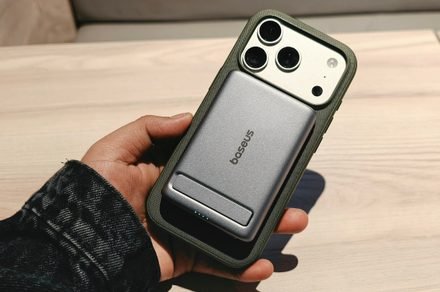
One of the biggest — if not the defining — reasons to pick up the Baseus PicoGo AM31 wireless power bank is the size and bulk. It tips the scales at just over 140 grams, and its compact size ensures that you can keep it in just about any pocket on your attire or carry bag. And as you can see in the image below, the tiny power bank can even fit in the small pocket of my jeans.
Image used with permission by copyright holder
If you are someone who doesn’t like to carry a bag for gadgets and wires in a bag, and trust your laptop (and phone) to last the whole outdoor work session away from a power port, the Baseus PicoGo AM31 should serve as a perfect companion device.
You can shake your iPhone without the case flying off.
Another crucial perk is the built-in magnet. It’s pretty strong, and during my usage, the power bank never slid off my iPhone 17 Pro or the Google Pixel 10 Pro — both of which have magnetic rings underneath the real glass shell. The situation was no different with a case applied.
Nadeem Sarwar / Digital Trends
I tested Apple’s TechWoven Case for the iPhone 17 Pro and the Spigen Ultra Hybrid Neo One (Mag Fit) for the Galaxy S26 Ultra. Once again, the magnetic lock is pretty strong, and at no point will the Baseus power bank slip off the phone’s cover shell. You can hold the power bank in a vertically oriented position and let the phone hang off it.
But there are a couple of problems hiding behind the conveniences. First, not all phones fit well with the power bank. Any device with a large (or tall) camera outlay close to the charging coil will create a problem. The Pixel 10 Pro and iPhone 17 Pro slot in just fine. The Galaxy S26 Ultra? Not so much, as you can see in the image below.
Nadeem Sarwar / Digital Trends
Second, we have the USB-C port’s placement. The kickstand at the back is pretty useful. Whether you’re scrolling a social media feed or watching horizontal videos, it can comfortably handle any position for your phone. However, in portrait propped mode, you don’t want to tap too hard on the screen, or the phone will topple over.
It’s the placement of the USB-C port that is awkward. When the kickstand is in use, the USB-C port is at the bottom, which means you can’t charge it. Only when the kickstand is propping up the phone vertically is the USB-C port accessible for charging, or souping up another device with a cable.
Nadeem Sarwar / Digital Trends
Those two are not fundamental flaws, but worth considering. On the contrary, if your prerequisite is simply a small power bank with a strong magnetic connection and a built-in kickstand, the Baseus PicoGo AM31 Qi2 powerbank is arguably one of the best bets out there.
This power bank comes equipped with a 5,000mAh battery. Ideally, it should be enough for a full top-up on nearly every mainstream phone sold in the US. It can cover the iPhone 17 Pro (4,252 mAh), the Pixel 10 Pro (4,870 mAh), and the Galaxy S26 Ultra (5,000 mAh), while falling just short of the iPhone 17 Pro Max and the Pixel 10 Pro XL’s range.
Nadeem Sarwar / Digital Trends
In reality, there’s a bit of a power bleed happening, though nothing too much to worry about. You can blame the losses on voltage and thermal woes, something you will even face with electric cars and everything else in between that has an electrochemical foundation.
I mostly used it with my iPhone 17 Pro, and it took the battery from 7% to 78% in just over two hours. On the Pixel 10 Pro, the Baseus power bank could only manage 53% top up before it died. The charging times could also have been better, but that’s what you get here.
Broadly, it can handle a current-gen iPhone with an average Qi charging rate of 10-13% in half an hour.
Nadeem Sarwar / Digital Trends
I’d also like to highlight that the power bank runs hot when it’s juicing up your phone. And depending on the ambient temperatures, you may want to keep it outside your leather-lined bag or jacket pockets. Baseus says there’s a nine-layer heat protection system in place, so you shouldn’t worry too much about fire hazards.
When I first began using it, the ambient temperatures usually hovered between 8-14 degrees Celcius (46-57 degrees Fahrenheit). I noticed that the power bank didn’t get too hot when lying outside, but I could definitely feel the warmth building up. At no point did it get worryingly hot that I had to take it off the phone.
Apple’s iPhone 5C is apparently getting a second life, and this time it is not because it was a hidden gem that was slept on. In an NBC News segment, the network highlights a small but noticeable social media comeback for Apple’s old iPhone 5C. The sudden popularity is largely driven by Gen Z users
Published
4 months ago
in
By
Apple’s iPhone 5C is apparently getting a second life, and this time it is not because it was a hidden gem that was slept on.
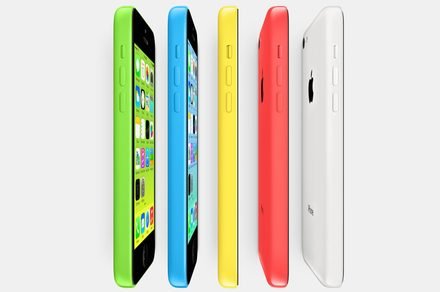
In an NBC News segment, the network highlights a small but noticeable social media comeback for Apple’s old iPhone 5C. The sudden popularity is largely driven by Gen Z users who seem drawn to its colorful design, “throwback” camera quality, and overall retro charm.
Recommended Videos
The story is less about raw utility and more about the vibes. So after the iPod, the colorful iPhone is the next to get a revival.
Apple
Why Gen Z is suddenly into the iPhone 5C again
The appeal behind the iPhone 5C is pretty simple. Gen Z is drawn to how different it feels from modern phones. Today’s smartphones mostly look like polished slabs of metal and glass. The iPhone 5C, on the other hand, is bright, plastic, cheerful, and a little awkward in a way that now reads charming rather than cheap.
NBC notes that another reason for the renewed interest is the camera. One of the on-screen captions specifically notes that the iPhone 5C is trending thanks to its grainy photo quality. The softer and lower image quality fits neatly into