Android

Vanguard review: Low fees and account options for all kinds of investors

 Summary List PlacementTable of Contents: Masthead Sticky Is Vanguard right for you? Vanguard Pros Vanguard Cons Commission-free stocks, ETFs, and options Brokerage, automated, and advisor-managed accounts available Thousands of low-cost mutual funds Multiple resources with expert analysis and market insights Several retirement accounts and services for retirement plan participants Higher options contract fee than other…

 Summary List PlacementTable of Contents: Masthead Sticky
Is Vanguard right for you?

Vanguard Pros
Vanguard Cons

Commission-free stocks, ETFs, and options
Brokerage, automated, and advisor-managed accounts available
Thousands of low-cost mutual funds
Multiple resources with expert analysis and market insights
Several retirement accounts and services for retirement plan participants

Higher options contract fee than other discount brokerages (Vanguard charges $1 per options contract)
No separate trading platforms for advanced traders
No cryptocurrencies

Established in 1975, Vanguard is a popular online brokerage that has just about everything for every type of investor. Among its products are brokerage accounts, automated and advisor-managed accounts, 529 education savings plans, IRAs, and more.
The company also has an array of websites for different purposes. Its websites cater to personal investors, institutional investors, financial professionals, and global clients. And if you’re solely focused on retirement, its expansive mutual fund selection and retirement plan participants services are hard to pass up.
As of January 31, 2021, Vanguard has more than $7.2 trillion in global assets under management, with more than 30 million investors in roughly 170 countries.
Its mobile investing app is available on iOS and Android devices.

Bottom line: Vanguard is a reasonable low-cost option for all types of investors. Whether you’re an active trader, passive investor, or retirement-focused individual, you’ll likely be able to find what you’re looking for.

Editor’s rating
4.51 out of 5

Fees
0% (0.15% to 0.30% for automated and professionally managed portfolios)

Account minimum
$0 ($3,000 for Vanguard Digital Advisor; $50,000 for Vanguard Personal Advisor Services)

Promotion
None at this time

Open account

Not sure if Vanguard is right for you? Keep reading to see how it stacks up against other online investment brokers.
How does Vanguard compare?

Min. Investment
$0 ($3,000 for Vanguard Digital Advisor; $50,000 for Vanguard Personal Advisor Services)

Min. Investment
$0 ($1 to start investing)

Min. Investment
$0 ($25,000 for Fidelity Personalized Planning and Advice)

Fees
0% (0.15% to 0.30% for automated and professionally managed portfolios)

Fees
0% for active trading and automated investing (1.25% for cryptocurrencies)

Fees
0% (up to 0.35% for robo-advisor)

Investment choices
Stocks, ETFs, options, bonds, mutual funds, and CDs

Investment choices
Stocks, ETFs, cryptocurrencies

Investment choices
Stocks, ETFs, options, mutual funds, bonds, CDs, annuities, and IPOs

Open an account
Open an account
Open an account

Vanguard, SoFi, and Fidelity all provide various account options for different types of investors. All three have self-directed brokerage accounts for active traders, automated accounts for passive investors, and IRAs for retirement-focused individuals.
But unlike Vanguard and Fidelity, SoFi doesn’t offer any advisor-managed investing accounts like Vanguard Personal Advisor Services or Fidelity Personalized Planning & Advice. SoFi also has a more limited selection of investment choices, but it could be a better fit for traders looking to dip their hands in the crypto space.
While Vanguard and Fidelity are mostly neck and neck, Vanguard’s fees are slightly higher than Fidelity’s in some areas.
If you’re still interested in exploring Vanguard, keep reading to see what the brokerage offers.
Ways to invest with Vanguard
Self-directed brokerage accounts
Vanguard’s self-directed brokerage accounts are best for active traders who want control over the investments they buy and sell. Available as individual or joint brokerage accounts, this option gives you access to an array of investment choices, including Stocks, ETFs, options, bonds, mutual funds, and CDs.
Stocks, ETFs, and options here are all commission-free, but be prepared to pay an additional $1 per options contract (this is higher than brokerages like Charles Schwab and Merrill Edge, which charge $0.65 per contract). Vanguard also offers thousands of mutual funds, and while minimums for those investments can range from $1,000 to $10,000, most Vanguard mutual funds require at least $3,000.
Not to mention, Vanguard is the home of the famous Jack-Bogle-created index mutual funds. These investments are great for those looking to take the slow-and-steady route to building wealth. See more here.
Automated and advisor-managed accounts
Not interested in picking investments on your own? Vanguard offers a couple of options for hands-off investors who prefer automated or advisor-managed accounts. These include the following:

Vanguard Digital Advisor: This is Vanguard’s automated investing account. It creates a personalized portfolio for you that’s composed of Vanguard ETFs. The account has a $3,000 minimum and 0.15% advisory fee. Read our full review here.
Vanguard Personal Advisor Services: This account merges automated management with one-on-one financial advisor support. Though it has higher fees (a $50,000 account minimum and 0.30% annual fee), you get to take advantage of professional advice from a Vanguard fiduciary advisor. Read our full review here.

IRAs
Vanguard is also a great resource for those interested in using retirement accounts to build wealth. The brokerage offers several options, including traditional IRAs, SEP IRAs, Roth IRAs, 401(k) rollovers, individual 401(k)s, and SIMPLE IRAs.
These retirement accounts give you access to Vanguard’s All-in-One retirement funds and countless ETFs.
Education savings plans
If you’re interested in investing for a child or dependent, Vanguard offers multiple options. These include its 529 education savings plans, UGMA/UTMA custodial accounts (these accounts let you invest for a child until they become adults), and trust administration and investment management services.
Educational resources and insights
If you’re new to investing and simply want to improve your expertise, Vanguard provides a plethora of investment education and market analysis resources (most of which are free for those without existing accounts).
You can tap into the following resources in its investor education section:

Getting started investing
Choosing investments
Trading online
Understanding taxes
Managing your portfolio
Investment research
Market summary

The brokerage also has a “News & Perspectives” hub that keeps you informed on the latest investing trends.
Is Vanguard trustworthy?
The Better Business Bureau has given Vanguard an A- rating to reflect its opinions of Vanguards customer complaint history, business practices, and advertising and licensing information. BBB ratings range from A+ to F, so this indicates a high level of customer engagement on Vanguard’s part.
Other factors the bureau considers include time in business, type of business, and government actions. But the BBB also states that its ratings don’t guarantee a company’s reliability or level of performance. For this reason, it’s important to conduct your own research as well.
Vanguard has closed fewer than 70 complaints in the last 12 months, according to BBB data.
Rickie Houston is a wealth-building reporter at Personal Finance Insider who covers investing, cryptocurrency exchanges, brokerage, and wealth-building products.
Related Content Module: More Investing CoverageJoin the conversation about this story »
Read More

Be the first to write a comment.

Leave a Reply

Your email address will not be published. Required fields are marked *

Android

Get the best of Bleeding Green Nation on the new SB Nation app

It’s a big day for Bleeding Green Nation. Today, the SB Nation app is live, and it’s the best way to follow the Eagles. You can download it by searching SB Nation for iOS or Android. A year ago we made some big changes to our community, including offering fewer ads and the addition of

It’s a big day for Bleeding Green Nation. Today, the SB Nation app is live, and it’s the best way to follow the Eagles.

You can download it by searching SB Nation for iOS or Android.

A year ago we made some big changes to our community, including offering fewer ads and the addition of the Feed. Today, we want to give you even more community tools and fewer ads with this app. It will make starting and joining conversations here as simple as posting to your favorite social media platform.

You can check out the video below showing off some of the useful features of the app, and we’ll dig into them below.

Why should I download the app?

The app will be the easiest way to interact with everybody else in the community:

  • All your favorite teams’ posts in one dedicated feed
  • Notifications when someone replies or recs your post
  • New game thread section, with an experience that’s smoother and faster
  • Fe

Read More

Continue Reading
Android

Get the best of Canal Street Chronicles on the new SB Nation app

It’s a really exciting day for Canal Street Chronicles. Today, the SB Nation app is live, and it’s the best way to follow all the latest Saints news. You can download it by searching SB Nation for iOS or Android. A year ago we made some big changes to our community, including offering fewer ads

It’s a really exciting day for Canal Street Chronicles. Today, the SB Nation app is live, and it’s the best way to follow all the latest Saints news.

You can download it by searching SB Nation for iOS or Android.

A year ago we made some big changes to our community, including offering fewer ads and the addition of the Feed. Today, we want to give you even more community tools and fewer ads with this app. It will make starting and joining conversations here as simple as posting to your favorite social media platform.

You can check out the video below showing off some of the useful features of the app, and we’ll dig into them below.

Why should I download the app?

The app will be the easiest way to interact with everybody else in the community:

  • All your favorite teams’ posts in one dedicated feed
  • Notifications when someone replies or recs your post
  • New game thread section, with an experience that’

Read More

Continue Reading
Android

The Galaxy Z Flip 8 is at its best when there’s friction

What do you want from a flip phone when it’s closed? A simple interface, perhaps notifications and a widget or two, for handling the basics? Or a fully fledged Android experience shrunk down for the Flip form factor? For years, Samsung has insisted on the former, even as some fans — and Razr rival Motorola

What do you want from a flip phone when it’s closed? A simple interface, perhaps notifications and a widget or two, for handling the basics? Or a fully fledged Android experience shrunk down for the Flip form factor? For years, Samsung has insisted on the former, even as some fans — and Razr rival Motorola — have pushed for the latter. With the Galaxy Z Flip 8, Samsung has given in.

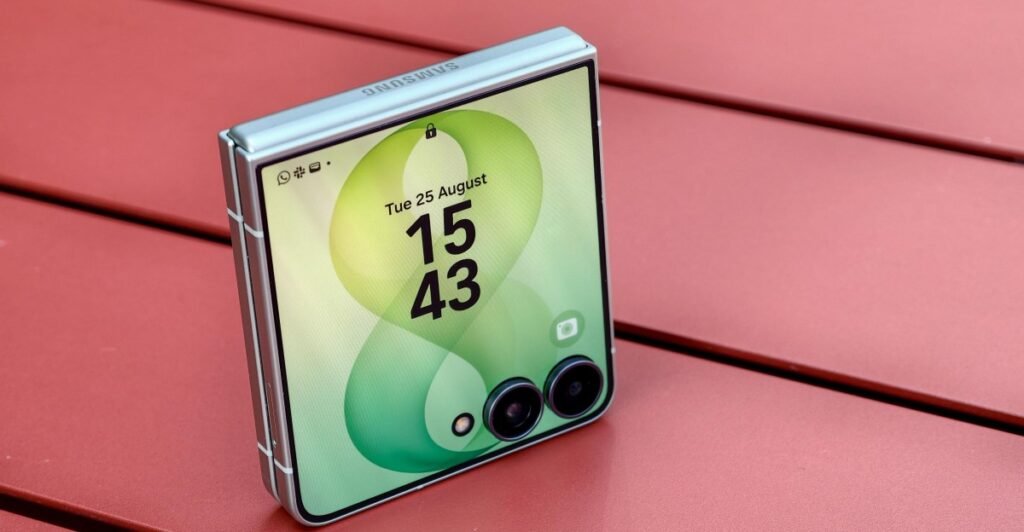
Although the Z Flip 8’s hardware is almost unchanged year-on-year, Samsung has fundamentally rethought how this phone is meant to be used when shut. The cover screen feels more like a regular Android phone, with easier access to the full versions of every single app, letting you browse social media, watch movies, and play games without ever opening the phone. Not every app works well on a tiny square screen with two cameras in the middle of it, but even when they don’t, that friction between me and the distractions of my phone still feels as much a feature as a bug.

8

Verge Score

Samsung Galaxy Z Flip 8

$1200
$1200

The Good

  • Runs any app on the cover screen
  • Thinner and lighter
  • Reliable battery

The Bad

  • Mostly a rehash of last year’s phone
  • Still vulnerable to dust
  • $100 more expensive than the Z Flip 7
$1200 at Amazon$1200 at Samsung$1200 at Best Buy
How we rate and review products

Everything exciting about the Z Flip 8 lies in its 4-inch cover screen, which is now more versatile than ever thanks to a homescreen redesign. Swiping down from the top left now brings up your notifications, while swiping from the top right instead shows a cover-screen-optimized version of the Quick Settings panel. Immediately, this feels more like a phone.

More exciting is what happens when you swipe up from the bottom: you get an app drawer. By default, this is populated with a selection of Samsung’s own apps that are optimized for the square screen, plus a “Labs” section with third-party options including Netflix and WhatsApp. But right below that, Samsung has included an easy prompt to install MultiStar, the Good Lock module that lets you run any app you’d like on the outer screen.

Samsung used to bury the option deep in the phone’s settings, only to be found by those who knew to look for it. The bottom of the app drawer isn’t quite front and center, but it’s much more prominent than it used to be.

You can run any app you’d like on the cover screen.
The Withings app scales badly: The graph takes up too much space to even show both axes, and it becomes impossible to scroll past it.
Google Maps works, but it’s busy and awkward, especially when you try to zoom in.
HBO Max works flawlessly, but it wouldn’t be my first choice to watch Lanterns.

You can still run apps in three forms: full-screen, with the cameras blocking part of the software; a square display that stops just above the level of the cameras; or a thin portrait-aspect ratio that letterboxes the sides. A small virtual button at the bottom of the screen lets you cycle through them.

Good performance isn’t guaranteed. Some apps, like Withings’ health tracker companion app, are almost impossible to use on the cover screen, with no configuration that leaves enough space for its graphs to fit. Google Maps is only a bit better — I love the idea of quickly checking my walking route without opening the phone, but there are so many floating interface elements that it’s unwieldy at best. Others work smoothly, but feel pointless: I can stream HBO Max on the tiny outer display, but I’d never want to.

But for other apps, the new cover screen options feel genuinely freeing. I can open Todoist and tick off a task, dip into WhatsApp to send a message, or open MyFitnessPal to log the snack I just ate. They’re quick actions that work well enough on the small screen, and because other apps — *cough* Instagram *cough* — don’t, I can dive into them without the risk of getting dragged into doomscrolling. That little bit of friction is just enough to save me from wasting 20 minutes I’ll never get back.

Like last year’s phone, the cover screen wraps around the cameras.

As for the hardware, little has changed. The Z Flip 8 is 0.6mm thinner and 8g lighter than its predecessor. This is the thickest of Samsung’s three current foldables, but it’s more compact than Motorola’s Razrs, its only real rivals.

Samsung didn’t upgrade the Z Flip 8 with the thinner, tougher titanium display stack found in the two new Z Fold 8 phones, which also means this has just as visible a crease as ever. It rarely bothers me, and is hard to see head-on, but you may feel differently. The IP48 rating is a more objective issue, and means that while this phone is mostly safe from water, it’s still vulnerable to dust.

Related

  • Samsung’s Galaxy Z Fold 8 feels like the future
  • Samsung’s Z Fold 8 Ultra is more of the same, but better than ever
  • Samsung Galaxy Z Flip 7 review: more of a good thing

On the inside, you’ll find the Qualcomm Snapdragon 8 Elite Gen 5 if you’re in the US, though my UK model runs Samsung’s Exynos 2600. Exynos chips get a bad rep, but performance has been smooth so far, and I have no real complaints.

This is the online-exclusive mint, but the phone’s also available in pink, cream, and gray.
It’s a little thinner and lighter than before, but not by much.
And the crease is still pretty noticeable compared to the two new Fold 8 phones.

As with the Z Fold 8 phones, Samsung switched to more energy-dense silicon-carbon batteries for the Z Flip 8. Unlike those phones, it didn’t actually increase the battery capacity, but instead used smaller cells with the same 4,300mAh capacity — the key to shrinking the phone itself. Still, battery life is solid, reliably lasting the full day with battery to spare. The charging — 25W wired, 15W wireless — is relatively unimpressive, and the only way to get Qi2 charging is still by using a compatible magnetic case.

Storage and RAM remain the same as on the Z Flip 7; the screens do too apart from small bumps to peak brightness, and the cameras are also identical to last year’s. The 50-megapixel main camera is impressive, and especially helpful since the form factor means you can use it for selfies too. The 12-megapixel ultrawide and 10-megapixel inner camera aren’t remarkable, but they get the job done. A slab phone at this price would have better cameras, and most likely a telephoto lens, but the lenses here are good enough.

<em>The main camera mostly gets good results.</em>
<em>It even handles moving targets like pets (and string) pretty well, though it did split the thread a little at the top.</em>
<em>Details and color still look solid in dark basement lighting like this.</em>
<em>The ultrawide is a little more basic.</em>
<em>Pushing up to the maximum 1srcx zoom shows the camera’s limitations.</em>

1/13
The main camera mostly gets good results.

The question is whether it’s all good enough for the price, given Samsung has bumped the Z Flip 8 up to $1,199.99, a $100 increase. Z Flip 7 owners certainly shouldn’t upgrade, and anyone else should consider buying that phone instead, since the difference between the two is slight.

After all, the big upgrades are software, and unlikely to remain exclusive. Last year’s Z Flip 7 hasn’t yet been updated to One UI 9, but since its outer screen is almost identical, it seems likely to get the upgraded software, giving one less reason to opt for the new model. The Z Flip 6 and earlier, with their smaller cover screens, seem more likely to miss out. I’ve asked Samsung about its upgrade plans, but haven’t yet heard back.

Customizable Now Brief cards were added in One UI 9.
The camcorder-inspired video recording is still one of the phone’s best features.
If you find the full apps frustrating, various cover screen widgets are still available.

Most of the other software upgrades aren’t even Flip-specific. Customizable, AI-powered cards have been added to the daily Now Brief; My FanCam lets you crop video to focus on a specific subject; and Audio Eraser can now dim background noise and highlight dialogue in apps like YouTube and Netflix. You’ll find those features across all of Samsung’s new foldables, plus the new Galaxy S26 FE.

Modest as the Z Flip 8’s hardware upgrades are, it feels like a turning point for Samsung, which is mostly done trying to limit the ways people use the cover screen. Given the speculation that the short, wide Z Fold 8 could replace the Flip form factor as Samsung’s “small phone that unfolds to a big phone,” it makes sense to close the gap between them.

The Z Fold 8 is definitely bigger than the Z Flip 8.
But the Flip’s small, obstructed screen is less functional — for better or worse.
Open, the Z Fold 8 feels like a compact tablet.
While the Flip opens up to a pretty regular phone.

The Z Fold 8 is a more capable phone than the Z Flip 8 when closed, its squat screen more usable than the Flip’s tiny one, despite Samsung’s software upgrades. But I have a real soft spot for the Flip form factor, which is tiny and pocketable when closed and a normal, almost compromise-free flagship phone when open — and endlessly satisfying to flip shut.

More than that, I enjoy its frictions. I welcome Samsung’s move to make it easier to use full apps on the cover screen, but I also welcome that it will never be entirely successful. Some apps simply don’t work on a screen this size, and the Z Flip 8 is all the better for it.

Photography by Dominic Preston / The Verge

Agree to Continue: Samsung Galaxy Z Flip 8

Every smart device now requires you to agree to a series of terms and conditions before you can use it — contracts that no one actually reads. It’s impossible for us to read and analyze every single one of these agreements. But we started counting exactly how many times you have to hit “agree” to use devices when we review them since these are agreements most people don’t read and definitely can’t negotiate.

To use the Galaxy Z Flip 8, you must agree to:

  • Google Terms of Service
  • Google Play Terms of Service
  • Google Privacy Policy (included in ToS)
  • Install apps and updates: “You agree this device may also automatically download and install updates and apps from Google, your carrier, and your device’s manufacturer, possibly using cellular data.”
  • Samsung End User Licence Agreement
  • Samsung Privacy Notice
  • Samsung Terms and Conditions

There’s also a variety of optional agreements, including:

  • Provide anonymous location data for Google’s services
  • “Allow apps and services to scan for Wi-Fi networks and nearby devices at any time, even when Wi-Fi or Bluetooth is off.”
  • Send usage and diagnostic data to Google
  • Google Gemini Apps Privacy Notice if you opt in to using Gemini Assistant
  • Turn on Samsung offline finding
  • Samsung news and special offers
  • Samsung personalized advertising
  • Bixby personal data intelligence
  • Samsung customization service

Other features, like Google Wallet, may require additional ag

Read More

Continue Reading
Android

Elon Musk to launch XChat as part of push to build WeChat-like super app

Elon Musk’s social media platform X (formerly Twitter) said its instant messaging app XChat will launch on Apple App Store on April 17, as Musk pushes ahead with plans to build a super app similar to China’s WeChat. An Android release date has yet to be announced…

Elon Musk’s social media platform X (formerly Twitter) said its instant messaging app XChat will launch on Apple App Store on April 17, as Musk pushes ahead with plans to build a super app similar to China’s WeChat. An Android release date has yet to be announced…
Read More

Continue Reading