How to spot a phishing attack is increasing important as a phishing attack is one of the most used techniques by malicious parties and information thieves in order to retrieve critical personal information from unaware users on the internet. These attacks are made through emails or websites designed to deceive the user and convince them that the email or website comes from a legit source.
The objective of a phishing attack is to make the user click a link, open a document, install a malicious program or give away their personal information (such as passwords or online banking data), and many people fall under these schemes because they don’t know how to identify false websites or emails. Keep reading to find five ways to spot a phishing attack. To prevent the malicious program outcome from phishing attacks check out our article – top 5 antivirus programs for 2018.
Check the URL at all times
If you’ve received an email that seems wrong, or are being asked for sensitive information, always check the URLs. First of all, make sure you’re on a secure, HTTPS connection: your web browser should tell you this. Also, check if the URL of the website you’re currently in (or any URL you receive through email) is from whoever tells you it is: for example, www.paypal.com is PayPal’s website URL, but if you are linked to wwwpaypal.com, that’s not a good sign.
Check for poorly written text
Another common characteristic of phishing attacks is that their messages are poorly written. Be wary of a seemingly official website with poor grammar, incoherent sentences, lack of punctuation sign and lack of legal notices. Most of the time, reputable websites and sources have faultless text and messages on their websites and emails, while phishers fail to copy these texts and write the messages themselves.
Be wary if they ask for personal information
A golden rule to recognize that something’s not right is that you are being asked for personal information. There’s no point on giving somebody else your password if you’re not signing into a website or actively using their services, and the same can be said of your credit card private information. Never send this kind of sensitive information through email if you’re being asked for it, and verify that you’re actually on the website you think you are before trying to log in.
Don’t fall for actions you didn’t start
You might have seen an ad or received an email telling you that you have “won the lottery” or “earned a free product”. This might sound attractive, but it’s actually a widely popular phishing method. The key to avoiding falling for this kind of scam is to know not to trust any information that tells you you’ve “won” or achieved something you didn’t even do.
Confirm the identity if you suspect something’s not right
Finally, if you receive a suspicious message from someone you trust, like a family member or workmate, confirm with them if they actually sent it: it’s possible that they were a victim of identity theft, or a phishing attack, and malicious parties are using their email address and contacts to obtain more information.
A South Australian man has been charged over alleged online threats toward police officers. The AFP’s National Security Investigations (NSI) team began an investigation in September after South Australia Police referred a series of social media posts for investigation. It’s alleged the posts advocated violence against police and made threats towards a number of senior
Published
3 days ago
in
By
A South Australian man has been charged over alleged online threats toward police officers. The AFP’s National Security Investigations (NSI) team began an investigation in September after South Australia Police referred a series of social media posts for investigation. It’s alleged the posts advocated violence against police and made threats towards a number of senior Read More
From touchscreen and QR-code devices to NFC cards and Bitcoin-only models, this guide compares hardware wallets by security, connectivity, usability and recovery options to help users choose the right fit…
Published
5 days ago
in
By
From touchscreen and QR-code devices to NFC cards and Bitcoin-only models, this guide compares hardware wallets by security, connectivity, usability and recovery options to help users choose the right fit… Read More
Nexo says 67% of affluent investors own crypto, but integration stays low. Security, fees and platform complexity emerge as key barriers to adoption. US investors show deepest crypto integration despite lower ownership rates. High-net-worth investors are increasingly buying crypto, but many are still reluctant to make it a major part of their long-term wealth plans
Published
2 weeks ago
in
By
Nexo says 67% of affluent investors own crypto, but integration stays low.
Security, fees and platform complexity emerge as key barriers to adoption.
US investors show deepest crypto integration despite lower ownership rates.
High-net-worth investors are increasingly buying crypto, but many are still reluctant to make it a major part of their long-term wealth plans, according to a new Nexo survey.
The report found that 67% of affluent investors across the US, UK and Argentina already own crypto. However, security concerns, high fees and complicated platforms are stopping many from using digital assets for retirement planning or replacing traditional investments.
Nexo published its “Future of Digital Wealth 2026” report on September 23 after surveying 1,000 affluent investors. Its new Crypto Integration Index, which measures how deeply crypto is incorporated into investors’ finances, produced an average score of 4.83 out of 10.
Ownership outpaces deeper integration
Nexo said a score near the survey average of 4.83 represents a small, short-horizon crypto position outside retirement planning.
Only 4.7% of surveyed investors scored seven or higher, a level Nexo describes as structurally integrated, where crypto has replaced a traditional asset and forms part of longer-term financial planning.
The report found that just under 20% of respondents expect crypto to become their number-one personal wealth driver over the next decade, ahead of salary, equities and real estate.
More than 40% are already invested in crypto without yet building wealth with it.
“Once an investor gets past the risk perception stage, what’s left is security, fees, and platform user-friendliness and capabilities – the same things we’ve spent years building Nexo to solve,” said Neil Steinhardt, COO, Nexo US.
That’s the gap between owning crypto and actually building wealth with it, and it’s exactly where our platform is designed to meet investors.
Integration also varies by market. Argentina had the highest ownership rate at 74%, but a CII score of 4.62. The US had the lowest ownership at 62%, but the deepest integration with a score of 5.07.
The UK recorded 65% ownership and a CII score of 4.75.
Platform trust becomes the next hurdle
The report said crypto integration peaks among investors aged 35 to 44, with 28% treating digital assets as a core retirement asset.
Investors aged 18 to 25 reported the highest ownership and conviction, with more than 90% holding crypto, but only 2% maintaining a horizon of 10 years or longer.
close Video Israeli Ambassador to the United Nations Danny Danon condemns the UN for allegedly including Israel in sexual violence blacklist Danny Danon, the Israeli Ambassador to the United Nations (UN), blasts the UN for what he claims is their decision to include Israel in a sexual violence blacklist that also includes Hamas. NEWYou can
Published
2 weeks ago
in
By
close
Video
Israeli Ambassador to the United Nations Danny Danon condemns the UN for allegedly including Israel in sexual violence blacklist
Danny Danon, the Israeli Ambassador to the United Nations (UN), blasts the UN for what he claims is their decision to include Israel in a sexual violence blacklist that also includes Hamas.
NEWYou can now listen to Fox News articles!
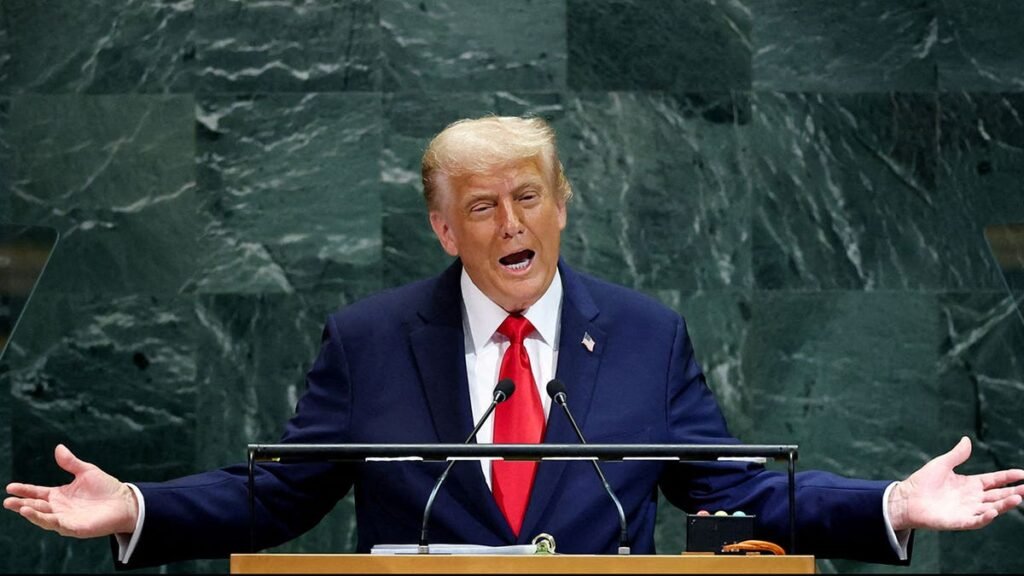
Today, President Trump will address the U.N. General Assembly. As New Yorkers fume over traffic nightmares created by the president and by hordes of visiting diplomats, they may (again) question, as do many Americans, why U.S. taxpayers support this badly managed and scandal-scarred institution. Especially when the U.N. so frequently works against our interests and seems incapable of accomplishing its primary mission.
A new Gallup poll shows that 73% of Americans think the U.N. does a poor job of “maintaining international peace and security,” and 70% say the same about the U.N. “upholding international law” and “protecting human rights.” That’s a lousy report card for an organization that spends roughly $70 billion per year.
Elsewhere in the world, the U.N. scores better, which is not surprising since poor countries, which constitute the majority of members, look to wealthier nations for handouts via the U.N. The nations of Sub-Saharan Africa, for instance, are especially keen on the sprawling organization.
How does that wealth transfer happen? One way was described by President Trump’s U.N. Ambassador Mike Waltz in recent testimony before Congress: “The U.N. let countries use peacekeeping missions as cash cows for their militaries. Peacekeepers could bring equipment, park it, never use it, take it home brand new, and get it paid for by the U.N.” Those operations can employ “10,000 to 18,000 soldiers”; the costs, Waltz says, are “quite significant.” He is ending that practice — just one step in reforming the bloated U.N., whose budget has quadrupled over the past 25 years.
Americans have reason for skepticism, given the frequent votes that go against the U.S. or our ally Israel. For thirty-three years in a row, the General Assembly has voted to end our embargo on Cuba, and for decades it has opposed Israel’s attempts to protects its citizens from Palestinian terrorists. Waltz calls the body a “cesspool of antisemitism.”
WALTZ SLAMS FRANCE AFTER STUNNING SOCIAL MEDIA ATTACK ON US AFTER UN VOTE
Not only is the U.N. frequently hostile to the U.S., it is often ridiculous. Most recently, the U.N. voted overwhelmingly to adopt a new map which blows up Africa’s presence on the globe; the U.S. was the sole dissenter. In a memo explaining our outlier vote, Deputy U.S. Representative Yaryna Ferencevych called such resolutions “barnacles on our work here” and wrote: “Instead of focusing on genuine problems of international peace… this body is debating map projects from the 16th century, and their role in promoting reparations and “cognitive justice.”
The U.N. rarely has much real-world impact. Critics might question, for instance, what the U.N. has done to resolve the Russia-Ukraine War, or how it has helped keep the world’s oil flowing through the Strait of Hormuz. The answer in both cases is zero.
Instead, the U.N. is hyper-focused on climate change, gender equality and other issues that may scratch a globalist itch, but appear little related to the cause of peace.
Video
Meanwhile, the U.N. is going broke. Last year the Economist reported: “On May 5th the U.N. will brief members on a previously unreported $600m (17%) cut to its $3.7bn [administrative] budget aimed at avoiding default this year. It will include a hiring freeze… Yet it may not be enough. A combination of deadbeat members and mad budget rules have led to a liquidity crisis.”
TRUMP BRINGS NEW HEAT TO CONTROVERSIAL UN AGENCY AS ALLEGED HAMAS TIES ENGULF SCORES OF EMPLOYEES
The article goes on to warn that a “leaked memo” suggesting that the Trump administration might cut off funding to the U.N. threatened “a financial crash in the citadel of peace and security.”
The Trump White House has not bankrupted the U.N. by withholding payments. Instead, it appointed Waltz to drive much-needed reforms and who is, according to Politico, “generally well-regarded, including among many Democrats on Capitol Hill.” That’s rare praise for a Trump appointee.
TRUMP ADMINISTRATION PROBES UNRWA OVER ALLEGED EMPLOYMENT OF 1,500 TERRORISTS
Waltz is working to downsize the bloated U.N., focusing on its staff of 100,000 — individuals who are paid roughly 17% more than equivalent U.S. civil servants, according to Waltz. According to testimony he gave to Congress a few months ago, Waltz’s team pushed through a “historic 15% cut $570 million out of the U.N.’s regular budget. That will eliminate nearly 3000 headquarters positions.” That change alone provided a savings for U.S. taxpayers of $126 million. Waltz recently told Fox Digital that budget cuts now total $1 billion.
Waltz is also overhauling U.N. peacekeeping operations, some of which, as he has said, have been around for “30, 50 or even 80 years.” Waltz argues such forces are important to provide breathing room for political settlement of a conflict, but it “can’t then become an excuse to not have a political resolution. When you have a peacekeeping force, for example, in DRC and Congo, at the cost of a billion dollars a year, that’s been there for 30 years,” it should end.
Video
Waltz is just getting started; reforming an institution so large and complex takes time, which he may not have. Soon, the U.N. will elect a new secretary-general to succeed Portugal’s António Guterres, who has served since 2017. Currently, most of the candidates who have stepped forward appear eager to embrace the reforms advocated by the White House, alarmed that President Trump is ready to eviscerate the U.N.’s funding if changes are not made and a U.S.-friendly official not elected.
CLICK HERE FOR MORE FOX NEWS OPINION
Finances are not Trump’s only weapon. As Politico reported, when the White House announced the creation of the Board of Peace last year to oversee the Israel-Gaza conflict, “U.N. officials and diplomats were really, really unnerved,” seeing that Board as some sort of “rival peacemaking institute.”
TRUMP-BACKED BOARD OF PEACE, ISRAEL ‘WILL TAKE ACTION’ IF HAMAS REMAINS OUT OF COMPLIANCE: NETANYAHU ADVISOR
However, permanent members of the Security Council, which include Russia, China, France, the U.K. and the U.S., can veto candidates. That is making the race unpredictable. If the members cannot agree, they could extend Gutterres’ term by another year, which would likely mean that President Trump would have less say in the outcome.
CLICK HERE TO DOWNLOAD THE FOX NEWS APP
That could trash the White House’s push to Make the U.N. Great Again and would be disastrous for the U.N.
CLICK HERE TO READ MORE FROM LIZ PEEK
Liz Peek is a Fox News contributor and former partner of major bracket Wall Street firm Wertheim & Company. A former columnist for the Fiscal Times, she writes for The Hill and contributes frequently to Fox News, the New York Sun and other publications. For more visit LizPeek.com. Follow her on Twitter @LizPeek.
Best of Opinion
Get the recap of top opinion commentary and original content throughout the week.
Arrives Twice a week
By entering your email and clicking the Subscribe button, you agree to the Fox News
Privacy Policy
and
Terms of Use
, and
agree to receive content and promotional communications from Fox News. You understand that you can
opt-out at any time.
Subscribed
You’ve successfully subscribed to this newsletter!
close
Video
Israeli Ambassador to the United Nations Danny Danon condemns the UN for allegedly including Israel in sexual violence blacklist
Danny Danon, the Israeli Ambassador to the United Nations (UN), blasts the UN for what he claims is their decision to include Israel in a sexual violence blacklist that also includes Hamas.
NEWYou can now listen to Fox News articles!
Today, President Trump will address the U.N. General Assembly. As New Yorkers fume over traffic nightmares created by the president and by hordes of visiting diplomats, they may (again) question, as do many Americans, why U.S. taxpayers support this badly managed and scandal-scarred institution. Especially when the U.N. so frequently works against our interests and seems incapable of accomplishing its primary mission.
A new Gallup poll shows that 73% of Americans think the U.N. does a poor job of “maintaining international peace and security,” and 70% say the same about the U.N. “upholding international law” and “protecting human rights.” That’s a lousy report card for an organization that spends roughly $70 billion per year.
Elsewhere in the world, the U.N. scores better, which is not surprising since poor countries, which constitute the majority of members, look to wealthier nations for handouts via the U.N. The nations of Sub-Saharan Africa, for instance, are especially keen on the sprawling organization.
How does that wealth transfer happen? One way was described by President Trump’s U.N. Ambassador Mike Waltz in recent testimony before Congress: “The U.N. let countries use peacekeeping missions as cash cows for their militaries. Peacekeepers could bring equipment, park it, never use it, take it home brand new, and get it paid for by the U.N.” Those operations can employ “10,000 to 18,000 soldiers”; the costs, Waltz says, are “quite significant.” He is ending that practice — just one step in reformin
!—->!—->!—->!—->!—->!—->!—->!—->!—->!—->!—->!—->!—->!—->!—->!—-> Read More