Antivirus

Avira Phantom VPN

Avira Phantom VPN 1 YearUS$4,33/mthViewat AviraAvira Phantom VPN 1 MonthUS$6,99/mthViewat Avirapowered by Avira Phantom VPN is aimed very much at the novice user. The website landing page ignores almost every technical detail, and instead focuses on generic descriptions of the benefits of a VPN: anonymity, encryption and accessing geoblocked content. But dig into the small…

Avira Phantom VPN 1 Year

at

at

Avira Phantom VPN is aimed very much at the novice user. The website landing page ignores almost every technical detail, and instead focuses on generic descriptions of the benefits of a VPN: anonymity, encryption and accessing geoblocked content. But dig into the small print, and there are some details to be found.

The network has a minimal 150 servers spread across 37 countries, for instance. There are multiple locations in North America and Europe, and more in Australia, Brazil, Chile, Hong Kong, India, Japan, Mexico and Singapore.

Check out the website here

Avira Phantom VPN makes its connections using the industry-standard OpenVPN and AES-256 encryption. That’s good, too, but there’s another ‘but’: you can’t tweak OpenVPN in any way (switch between UDP and TCP connections, for instance), and you can’t switch to another protocol, which can sometimes be useful if you can’t get connected.

Avira doesn’t mention P2P support at all on the website, as far as we could see. A quick check shows torrenting seems to be available on all servers, although as the company seems so unenthusiastic about it, Phantom VPN wouldn’t be our preferred torrent choice.

The service does have one unusual plus, with no ‘buts’ at all: you can connect to it with as many devices as you like. That’s a notable improvement on many VPNs, which typically restrict you to 5 devices, although how many people really need to connect with more than that simultaneously is open to question.

Website

You can download the free version of Avira Phantom Pro to test it out before signing up for one of the company’s paid plans (Image credit: Avira)

Plans and pricing

Whatever you think of Phantom VPN’s features, there’s a definite benefit in its free account. This has by default a crippling 500MB/month data cap (plus you get five additional free minutes after hitting the limit, before disconnection), and you’re not able to choose a location – the app automatically connects to your nearest server. Still, it doesn’t require registration or an email address: just download, install and connect. Register with your email address and you’ll get 1GB. You still won’t be able to stream anything much, but for occasional low-bandwidth use, perhaps while travelling, it might be enough.

Upgrading to a paid account gets you unlimited data, a kill switch to reduce the chance of a data leak if the VPN connection drops, and technical support to keep everything running smoothly.

The service is priced at $10 billed monthly, dropping to $6.50 if you pay for a year up-front, or $5.99 to cover Android and iOS devices only.

Buy the service this way, and it looks expensive. Private Internet Access’ annual plan ‘only’ covers up to 5 devices (mobile or desktop), but it’s much cheaper at an effective $2.85 for the first term, $3.33 on renewal.

Avira’s best deal comes in the form of its Avira Prime package, a full bundle of every application and service it sells: antivirus, internet security, password management, device cleanup and more. You can buy this for $75 in year one, so cheaper than the VPN alone, rising to a still decent $100 a year after that.

It’s a powerful package – read our full review here – and if you’re looking for a VPN and a new antivirus or security suite, getting them in a bundle like this could save you plenty of cash.

Privacy and logging

Avira Phantom VPN gets off to a good start in privacy terms with its no-registration-required free account. 

The service does a decent job of protecting your traffic with its OpenVPN protocol support, although your inability to change or tweak these in any way (choose new ports, for instance) might be an issue for experts.

Avira’s free plan doesn’t give you a kill switch, which means there’s a small chance your identity might be given away if the VPN connection drops. That’s not a problem if you upgrade, though, and the free and paid editions both give you capable DNS leak protection. We checked the desktop and mobile clients with IPLeak, DNSLeakTest and DoILeak, and found no privacy leaks of any kind.

Avira has a tiny amount of no-logging detail in its privacy policy. How tiny? This is what it says: 

‘If you use Avira Phantom VPN we do not collect any data about the web pages you visit or the services you use on the internet. The information we require for our billing system only tells us when someone was online and what data volume was utilized.’

In other words, there’s limited session logging (connect and disconnect times, data used), but the company doesn’t record any details on exactly what you’re doing online. We’d like to see this spelled out in a little more detail, but it’s still good news overall.

Avira Launcher

Avira Phantom VPN uses the standard Avira Launcher (Image credit: Avira)

Apps

Installing Avira Phantom VPN on a PC is easy, although it does have the same issue as all other Avira software: you also get the standard Avira launcher, whether you want it or not.

(There’s nothing wrong with the launcher – it’s a simple way to view and manage all your Avira products from one place – but if you’re only using Phantom VPN, it’s just not necessary.)

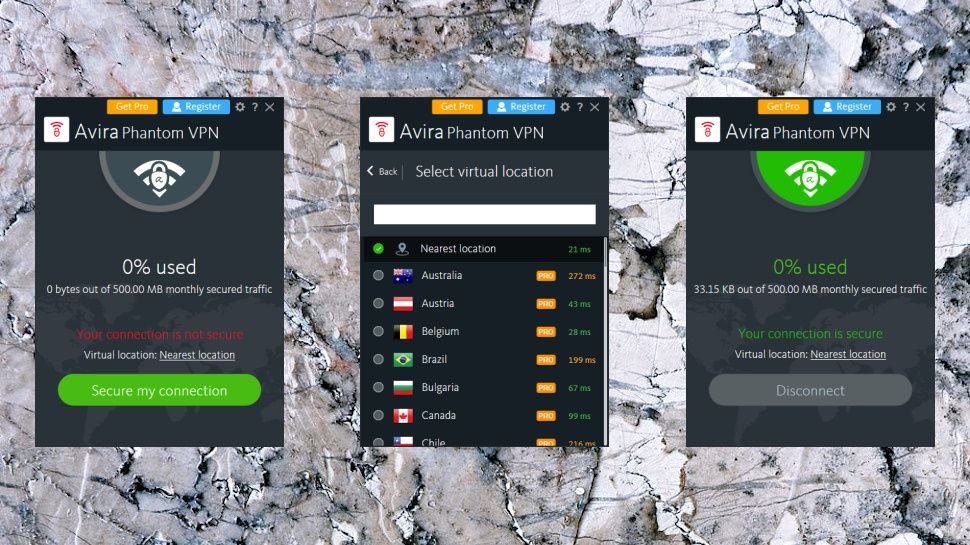
The launcher can be safely ignored, though, and otherwise the client looks and feels much as you would expect. Launch it from a system tray icon, and click a button to connect to the nearest VPN server, or, if you have the paid version, choose your preferred option from a list. Easy.

Windows App

This is the user interface of Avira Phantom VPN’s free Windows app (Image credit: Avira)

The location picker is relatively basic, with no ability to view servers within a country, and no Favorites system. Location ping times help choose the best server for you,

Read More

Be the first to write a comment.

Leave a Reply

Your email address will not be published. Required fields are marked *

Antivirus

Why There’s Simply No Need For Android Antivirus Apps Anymore

Many Android users install an antivirus app on a new device without thinking twice. In 2026, there are good reasons to skip that step entirely…

Many Android users install an antivirus app on a new device without thinking twice. In 2026, there are good reasons to skip that step entirely…
Read More

Continue Reading
Antivirus

‘People use smartphones more but invest less in their security’: New report claims McAfee and Norton remain the most loved antivirus brands as users ditch lesser-known security products for free tools like Microsoft Defender or Apple Xprotect

Copy link Facebook X Whatsapp Reddit Pinterest Flipboard Threads Email Share this article 0 Join the conversation Follow us Add us as a preferred source on Google Newsletter Subscribe to our newsletter Most smartphone users rely on built-in security without additional protection Paid antivirus adoption on mobile devices continues to decline steadily A significant share


  • Most smartphone users rely on built-in security without additional protection
  • Paid antivirus adoption on mobile devices continues to decline steadily
  • A significant share of users remains unprotected or unaware of safeguards

Most Americans now use their smartphones more than their computers, but very few spend money to protect those phones from hackers, new research has claimed.

A Cybernews report surveyed over 1,000 American adults, and found only 18% of mobile phone users pay for third-party antivirus software.

Built-in tools like Microsoft Defender and Apple’s XProtect have become the default choice for most people, while McAfee and Norton lead the paid market for the second year in a row.

Latest Videos From

You may like

  • Best antivirus software Best Antivirus Software 2026
  • People using Windows 11 laptops Can Windows 11’s built-in antivirus keep you safe? Microsoft thinks so
  • Norton 36src Premium Norton 360 Premium will protect your devices from AI scams, malware, and identity theft for less than $30

Smartphone owners are skipping extra security protections

Most consumers believe the security features already built into their phones are sufficient for daily use, and see little reason to spend extra money on something they think they already own for free.

Roughly 14% of mobile users say they have no cybersecurity tools installed at all on their devices. Another 16% cannot even name what protections they currently have in place.

On desktop computers, the situation looks very different, with far fewer unprotected machines and much wider adoption of third-party security tools.

Windows Defender and Apple’s native security features now serve as the primary defense for 53% of computer users and 51% of mobile users.

Most people choose these free options because they trust the operating system vendor to provide adequate baseline protection.

Paid antivirus adoption on computers has actually grown by 2% since last year, reaching 41% of users.

On mobile devices, however, third-party antivirus usage has dropped by roughly 10% over the same period, falling from 28% to just 18%.

What to read next

  • Customer at home looking happy because his network is protected by ESET Home Security We all need digital protection and the ESET Home Security Plan is the bees knees
  • A hand holding a mobile phone scans a QR code on a blurry laptop screen. The phone issues a warning that the QR code could be malicious. Microsoft phishing threat report shows 146% surge in quishing
  • Malware attack virus alert , malicious software infection , cyber security awareness training to protect business Time for an upgrade? Report warns outdated operating systems could be the ‘unnecessary risk’ your business forgot about

Mobile users face growing risks

Ransomware attacks targeting smartphones are still less common than those aimed at computers, but the threat landscape is shifting rapidly.

Users who depend solely on the free security tools that came with their phones may be underestimating what modern cybercriminals can do.

Paid subscriptions have gained ground over free alternatives, yet the majority of mobile owners still avoid spending money on dedicated protection.

Cybercrime exposure does influence some users to change their habits, but personal experience is not the main driver of adoption for most people.

Many users employ layered security approach, combining antivirus with VPNs and password managers.

However, the data shows that a large segment of mobile users remain either unprotected or unsure about what safeguards they have.

Established brands like McAfee and Norton continue to benefit from user trust, while lesser-known products struggle to gain acceptance even when their features are comparable.


Google logo on a black background next to text reading

Follow TechRadar on Google News and add us as a preferred source to get our expert news, reviews, and opinion in your feeds. Make sure to click the Follow button!

Read More

Continue Reading
Antivirus

Surfshark One review: Adequate antivirus protection with caveats

At a glanceExpert’s Rating Pros Clean, extremely simple interface Alternative ID lets you mask your whole identity, not just an email address VPN service is solid Cons Full scans hit PC performance hard Very few settings to adjust Not as many features as similarly priced rivals Our Verdict If VPN coverage is your first priority…

At a glanceExpert’s Rating

Pros

Clean, extremely simple interface

Alternative ID lets you mask your whole identity, not just an email address

VPN service is solid

Cons

Full scans hit PC performance hard

Very few settings to adjust

Not as many features as similarly priced rivals

Our Verdict
If VPN coverage is your first priority…
Read More

Continue Reading
Antivirus

NITDA raises alarm on DeepLoad AI malware attacks, proffers solutions

“Never paste commands from a website into your computer; legitimate software never asks for this. Do not open files named ‘Chrome Setup’ or ‘Firefox Installer’ from USB drives; scan all USB devices with antivirus software before use,” the agency said, warning corporate companies of possible cyber attacks…

“Never paste commands from a website into your computer; legitimate software never asks for this. Do not open files named ‘Chrome Setup’ or ‘Firefox Installer’ from USB drives; scan all USB devices with antivirus software before use,” the agency said, warning corporate companies of possible cyber attacks…
Read More

Continue Reading