Avira Prime


This is our all-in-one roundup reviewing every Avira consumer security solution for 2020. On this page, after our brief intro, you’ll find
(a) a full evaluation of the entry-level Avira Antivirus Pro, along with our reviews of the additional features incorporated with the rest of the range:
(b) Avira Internet Security, and
(c) the top-end package Avira Prime, and
(d) a quick look at Avira Free.
You can jump to the reviews of those individual products by clicking on the links in the bar at the top of this page, but bear in mind that this article is really designed to be read all the way through, as the features of Avira Antivirus Pro are also present in the higher-level security suites, of course.
Avira Free Antivirus, an interesting product with a surprisingly lengthy feature list: antivirus, malicious URL filtering, PC optimization, VPN and more.
Be sure to check the small print, though. While the free product has a great antivirus engine, significant limitations include no scanning of downloads or email attachments, URL filtering via browser extensions only, and no customer support. There are ads, too.
VPN, for example, limits you to a near useless 500MB a month, barely enough to run a single online speed test.
- You can sign up for Avira’s antivirus solutions here
Upgrading to Avira Antivirus Pro gets you scanning of downloads, torrents and cloud storage, automated checks of USB devices, an extra layer of ransomware protection, faster cloud scanning, system-wide URL filtering and ‘Premium’ custom support. Pricing looks a fraction high at $45 for a one device, one-year license, but that’s mostly because there’s no introductory discount. There’s better value as you extend your subscription, so for instance a three device, one-year license is a reasonable $58. (Bitdefender Antivirus Plus 2020 is $30 for year one, $60 on renewal.)
Avira Internet Security Suite adds a software updater and Avira’s own password manager.
Avira Internet Security is available for $58 for a one-year, one-device license, or $71 to cover three devices. As with Antivirus Pro, there’s no discount, and it looks a little overpriced for the feature you’re getting.
Avira Prime offers the best value in the range, with its annual five-device license costing $100. That gets you everything in Internet Security, plus premium Android and iOS apps, Avira’s hugely powerful PC speedup suite, and, crucially, unlimited use of Avira’s Phantom VPN Pro. It’s far from the best VPN we’ve seen (check out our full review here) but it covers the basics, and is worth $78 all on its own.
Overall, if you can live with Avira Free’s limits or use Prime’s VPN, these look like the pick of the range. Avira Antivirus Pro and Internet Security can’t compete.
If you can’t make up your mind, or you’re just not ready to commit, Avira Prime has a 30-day trial, and all products are available on a monthly subscription (a single device is priced at $5 for Antivirus Pro, $6 for Internet Security, $10 for Prime.) That’s an unusual but welcome touch which gives time to figure out if the suite works for you. The Prime plan is fair value, too – many VPN providers charge more than $10 for a monthly plan alone.
Avira Antivirus Pro

Avira Antivirus Pro installed easily for us, with no technical hassles of any kind, not even a ‘reboot now!’ demand when it was all over.
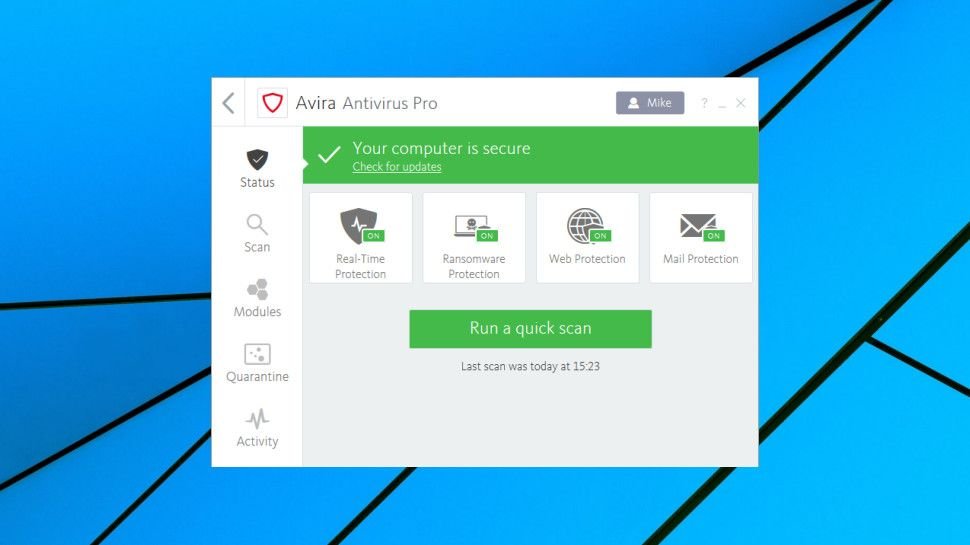
The Antivirus Pro interface clearly displayed our security status, with four buttons highlighting its active protection modules (Real-Time, Ransomware, Web and Mail protection). It’s all very straightforward, and one glance tells you everything you’ll want to know.
A Quick Scan button launches a basic check of your system, or clicking Scan on the left-hand sidebar displays buttons to run a full system scan, or launch a custom scan to check a specific area of the system.
Choosing a custom scan in most antivirus apps results in a prompt asking you which drive or folder you’d like to check. Avira gives you many more options, with predefined scans to check your Documents folder, the Windows folders, removable drives, active processes and more. You can also save new custom scans to check specific drives and folders, making it easier to recall them later.
You’re not able to define how these custom scans work (file types to check or ignore, detection methods to use, and so on), as you can with Avast and some others. Avira’s approach is an improvement on what we usually see, though, and manages to give more scanning control to expert users, while keeping everything very easy to use for everyone else.
Protection
AV-Comparatives’ Real-World Protection Test regularly checks 16 top antivirus engines against the very latest malware threats.
The July-October 2018 summary report saw Avira in a very impressive first place, blocking 100% of threats and raising just one false positive. (To put that in perspective, Windows Defender reached 9th place with a 99.3% detection rates and a very high 58 false positives.)
AV-Test’s November-December Home User Windows report wasn’t quite as impressive, with Avira blocking ‘only’ 99.4% of zero-day malware in one test. It reached 100% in the other three tests, though, enough to get a 6/6 rating and be awarded Avira’s Top Product award.
As Avira Antivirus Pro claims to have top-quality ransomware detection, we decided to pit the program against our own custom ransomware simulator. This is very basic and doesn’t use any stealthy malware tricks, but as we coded it ourselves, we knew it wouldn’t be in Avira’s signature database. The only way the package could detect our threat was by recognizing its behavior.
We launched our ransomware simulator, then watched as it successfully spidered through multiple folders in our test folder tree, encrypting more than 6,000 documents and data files, without Avira Antivirus Pro raising any alarm or making any attempt to spot it.
This isn’t what we wanted to see. In our last reviews of Kaspersky and Bitdefender, for instance, the apps not only managed to detect and kill our test software, they also recovered the handful of files our simulator managed to encrypt.
However, these results should be interpreted carefully. We think our ransomware simulator is a good way to highlight tools with effective malware detection, but failing the test doesn’t necessarily mean a package is bad.
The reality is that our ransomware simulator wasn’t real malware, and there’s no way to be completely sure why Avira Antivirus Pro ignored it. This issue has to be a concern, but the reality is that AV-Comparatives and AV-Test regularly test Avira’s engine against known and brand-new threats, and in these more thorough tests, the program performs very well.
Features
Browse Avira’s Modules list and you’ll find an On/ Off switch for a firewall, but don’t get your hopes up, this isn’t how it looks. There’s no extra network protection here, it’s just an alternative interface for the Windows firewall.
This doesn’t do very much, beyond make it fractionally easier to turn the firewall on or off, and tweak a handful of settings for your network profiles. Accessing any of the more features – setting application rules, for instance – just opens the regular Windows firewall dialogs. If you really need to take control of the Windows firewall, you’d be better off learning to find your way around the standard interface.
Avira’s Launcher enables installing several other free tools, but some are cut-down versions of other Avira products, and they’re all available separately, whether you buy Avira Antivirus Pro or not.
Still, the Avira launcher does make them easy to install and access, and some of the apps might be useful. A simple password manager stores your logins and syncs them across your devices, for instance. And Avira’s Privacy Pal enables customizing key Windows privacy settings, and has a file shredder to securely wipe your most confidential documents.
Final verdict
Avira Antivirus Pro has a great detection engine, but probably doesn’t have enough functionality to justify using it instead of the free version. Even if you’re happy to pay, competitors like Bitdefender give you more for a very similar price.
Avira Internet Security
Avira Internet Security is a bundle of products which includes Avira Antivirus Pro, Software Updater Pro and Password Manager Pro.
Avira’s Software Updater Pro is an easy-to-use patch manager which regularly checks for missing application updates, and can automatically install whatever it finds. There’s nothing for you to download, and you won’t see any installer apps.
Avira’s Password Manager Pro generates secure passwords, automatically fills in login forms for you, and syncs new credentials across all your devices.
If you’re used to security suites that come with a firewall, parental controls, maybe a spam filter, this could seem a little underpowered.
But if patch management and passwords are top of your priority list, it might be worth giving the suite a closer look.
Software Updater Pro
Avira’s Software Updater Pro claims it automatically updates ‘over 150 programs’, which is less than many competitors. The freeware Patch My PC updates more than 300, others can handle many more. Software Updater’s list is well chosen, though, and covers some very important apps and components: .NET, Acrobat Reader, CCleaner, Google Chrome, Firefox, IrfanView, Java, Opera, Paint.net, TeamViewer, VLC Media Player, and updates for Windows and assorted Windows components and layers.
The package mostly worked as advertised for us. We installed some old versions of supported apps, Software Updater found a decent 8 updates, and silently downloaded and installed 7. It couldn’t automatically update FileZilla, for some reason, but just getting an update alert was useful, and Software Updater also gave us a link to the FileZilla site where we could download and install it ourselves.
Software Updater can check for driver updates, too, although that’s much less useful. If it told you that your NVVHCI Enumerator driver was out of date, for instance, what would you think? Could that be causing problems, should you update it? Or is it the latest version that’s compatible with some other part of your system, and updating it would break your PC to the point it wouldn’t even boot?
It’s okay, we don’t have the faintest idea, either. Software Updater’s driver side might still be useful in that it could highlight a missing update which you can manually explore further, but that’s about it. The vast majority of people will be better off leaving driver support to Windows Update.
We have some issues with Software Updater, then, but it’s better than the patch managers you’ll get bundled with most security suites. Most users will get some value from it, and if that’s not you, you’re an expert who hates this kind of tool, no problem – you can use it for manual checks only (no automatic updates at all), or just uninstall the module and focus on the rest of the suite.
Avira Password Manager Pro
Avira Password Manager Pro is easy to set up just about anywhere. Install the Windows, Mac, Android or iOS apps, or the Chrome, Firefox, Edge or Opera extensions, import any existing logins and you’re ready to go.
The package includes a secure password generator, saves new credentials as they’re entered and can automatically complete login forms when you return.
There’s no form filling, though. You can’t save names, addresses, credit card details or anything else; it’s strictly passwords only.
Avira Password Manager Pro does have some advanced features. You can access your passwords with touch and face recognition, for instance, if they’re supported on your device. Two-factor authentication enables logging in via a security code sent to your phone. And the app can alert you to weak or reused passwords, or raise a notification if one of your accounts might have been hacked.
If you don’t have another password manager, Avira’s offering will simplify your logins, and could help make your accounts far more secure.
The service can’t begin to match the best of the competition, though, and if you’re after real password management power, you should probably look elsewhere.
Overall, then, Avira Internet Security is a lot like Antivirus Pro – it’s a decent package, but just doesn’t have enough functions or features for us to recommend it ahead of the competition.
If you’re after a more traditional security suite, particularly with a firewall and extra layers of network protection, you’ll be better off elsewhere.
But if you like Avira, and are just not so interested in Software Updater and Password Manager, keep reading. Avira’s high-end Prime bundle gives you a lot of more general-purpose power for a very fair price.
Avira Prime
Top of Avira’s consumer range is Avira Prime, a powerful bundle which comes crammed with essential functions and features.
The key security benefits are access to Avira’s premium Android and iOS apps, and a license covering up to five devices.
The most valuable extra is full access to Avira’s Phantom VPN Pro. And we do mean full access, with none of the data limits or user restrictions you’ll often get with other security suite VPNs. The license enables using the VPN as much as you like, on as many devices as you need, just as though you’d purchased it separately (which would normally cost $78.)
Experienced Windows users will also appreciate Avira’s System Speedup Pro, a very full-featured PC optimization tool. Forget the feeble apps you’ve seen in other suites, which often do less than Windows’ own Disk Cleanup – this outperforms many stand-alone specialist PC optimizers.
The suite is great value at just $100 for a five device, one-year license. If you’ll make regular use of the VPN, that’s one of the best deals you’ll find anywhere, but even if you don’t, Prime has more than enough power to justify a closer look. There’s a 30-day trial available if you’d like to find out more.
Mobile apps
Avira’s free Android and iOS apps cover the antivirus basics, but upgrading to Avira Prime gets you the full commercial editions with one or two valuable extras.
The Android app gains automatic blocking of malicious websites, for instance, along with more frequent updates to protect you from the very latest threats.
Webcam and microphone protection ensure apps can’t record you without authorization.
You’re able to lock your most sensitive apps with a PIN code, and there’s free customer support if you run into any problems.
Avi
Be the first to write a comment.