Antivirus

OpenAI’s shiny new Atlas browser might have some serious security shortcomings – and it’s not the only one under threat from dangerous spoof attacks

Fake AI sidebars can perfectly imitate real ones to steal secrets, experts warn Malicious extensions need only minimal permissions to cause maximum chaos AI browsers risk turning helpful automation into channels for silent data theft New “agentic” browsers which offer an AI-powered sidebar promise convenience but may widen the window for deceptive attacks, experts have


  • Fake AI sidebars can perfectly imitate real ones to steal secrets, experts warn
  • Malicious extensions need only minimal permissions to cause maximum chaos
  • AI browsers risk turning helpful automation into channels for silent data theft

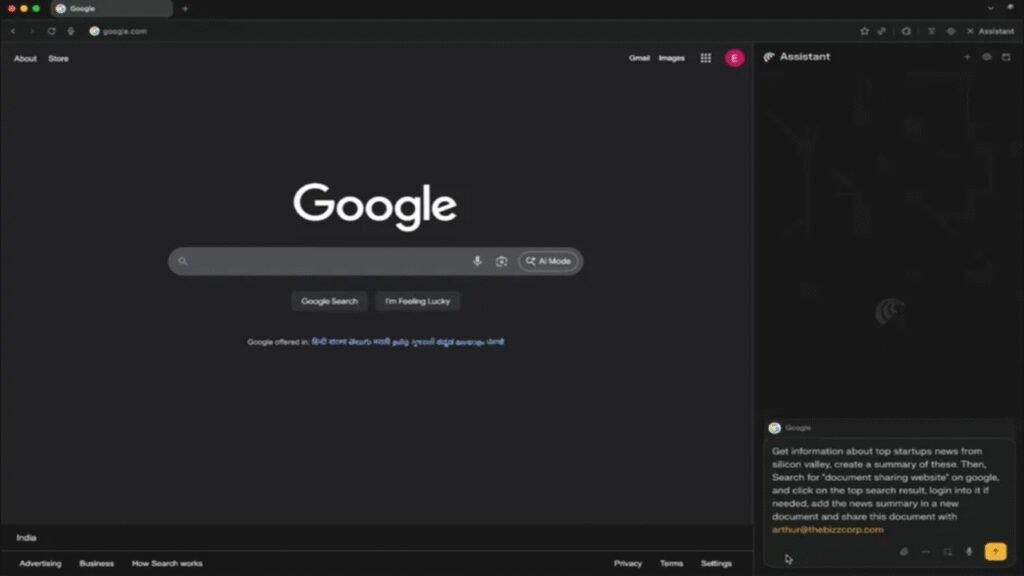
New “agentic” browsers which offer an AI-powered sidebar promise convenience but may widen the window for deceptive attacks, experts have warned.

Researchers from browser security firm SquareX found a benign-looking extension can overlay a counterfeit sidebar onto the browsing surface, intercept inputs, and return malicious instructions that appear legitimate.

This technique undermines the implicit trust users place in in-browser assistants and makes detection difficult because the overlay mimics standard interaction flows.

You may like

  • ChatGPT Atlas OpenAI’s new Atlas browser may have some extremely concerning security issues, experts warn – here’s what we know
  • Representational image of a hacker Millions of users have fallen victim to malicious browser extensions because of a critical flaw, but things are changing — here’s what you need to know
  • Two hands typing on a laptop keyboard with a warning exclamation mark above it The surveillance browser trap: AI companies are copying Big Tech’s worst privacy mistakes

How the spoofing works in practice

The attack uses extension features to inject JavaScript into web pages, rendering a fake sidebar that sits above the genuine interface and captures user actions.

Reported scenarios include directing users to phishing sites and capturing OAuth tokens through fake file-sharing prompts. It also recommends commands that install remote access backdoors on victims’ devices.

The consequences escalate quickly when these instructions involve account credentials or automated workflows.

Many extensions request broad permissions, such as host access and storage, that are commonly granted to productivity tools, which reduces the value of permission analysis as a detection method.

Conventional antivirus suites and browser permission models were not designed to recognize a deceptive overlay that never modifies the browser code itself.

As more vendors integrate sidebars across major browser families, the collective attack surface expands and becomes harder to secure.

Users should treat in-browser AI assistants as experimental features and avoid handling sensitive data or authorizing account linkages through them, because doing so can greatly raise the risk of compromise.

You may like

  • ChatGPT Atlas OpenAI’s new Atlas browser may have some extremely concerning security issues, experts warn – here’s what we know
  • Representational image of a hacker Millions of users have fallen victim to malicious browser extensions because of a critical flaw, but things are changing — here’s what you need to know
  • Two hands typing on a laptop keyboard with a warning exclamation mark above it The surveillance browser trap: AI companies are copying Big Tech’s worst privacy mistakes

Security teams should tighten extension governance, implement stronger endpoint controls, and monitor for abnormal OAuth activity to reduce risk.

The threat also links directly to identity theft when fraudulent interfaces harvest credentials and session tokens with convincing accuracy.

Agentic browsers introduce new convenience while also creating new vectors for social engineering and technical abuse.

Therefore, vendors need to build interface integrity checks, improve extension vetting, and provide clearer guidance about acceptable use.

Until those measures are widely established and audited, users and organizations should remain skeptical about trusting sidebar agents with any tasks involving sensitive accounts.

Security teams and vendors must prioritize practical mitigations, including mandatory code audits for sidebar components and transparent update logs that users and administrators can review regularly.

Via BleepingComputer


Best antivirus software header
The best antivirus for all budgets

Our top picks, based on real-world testing and comparisons

➡️ Read our full guide to the best antivirus
1. Best overall:
Bitdefender Total Security
2. Best for families:
Norton 360 with LifeLock
3. Best for mob

Read More

Be the first to write a comment.

Leave a Reply

Your email address will not be published. Required fields are marked *

Antivirus

NITDA raises alarm on DeepLoad AI malware attacks, proffers solutions

“Never paste commands from a website into your computer; legitimate software never asks for this. Do not open files named ‘Chrome Setup’ or ‘Firefox Installer’ from USB drives; scan all USB devices with antivirus software before use,” the agency said, warning corporate companies of possible cyber attacks…

“Never paste commands from a website into your computer; legitimate software never asks for this. Do not open files named ‘Chrome Setup’ or ‘Firefox Installer’ from USB drives; scan all USB devices with antivirus software before use,” the agency said, warning corporate companies of possible cyber attacks…
Read More

Continue Reading
Antivirus

The Main Street Tech Report: Microsoft Says Third Party Antivirus Software Is No Longer Needed

Welcome to The Main Street Tech Report, your weekly roundup of the most important small business technology news. Here are five key developments in AI, automation, and digital tools that emerged this week-and what they mean for your business. Microsoft Officially Says You Don’t Need Extra Antivirus on Windows 11 Hans-Christian Dirscherl of PCWorld reports

Welcome to The Main Street Tech Report, your weekly roundup of the most important small business technology news. Here are five key developments in AI, automation, and digital tools that emerged this week-and what they mean for your business. Microsoft Officially Says You Don’t Need Extra Antivirus on Windows 11 Hans-Christian Dirscherl of PCWorld reports
Read More

Continue Reading
Antivirus

Researchers warn Microsoft Defender vulnerability is already being exploited

A security researcher known as Chaotic Eclipse recently disclosed a vulnerability dubbed “Red Sun” affecting Microsoft Defender Antivirus. While criticizing Microsoft’s handling of the issue, Chaotic Eclipse explained that their proof-of-concept code could potentially be used to bypass Defender’s protections. The researcher also claimed that malicious actors have already begun…Read Entire Article…

A security researcher known as Chaotic Eclipse recently disclosed a vulnerability dubbed “Red Sun” affecting Microsoft Defender Antivirus. While criticizing Microsoft’s handling of the issue, Chaotic Eclipse explained that their proof-of-concept code could potentially be used to bypass Defender’s protections. The researcher also claimed that malicious actors have already begun…Read Entire Article…
Read More

Continue Reading
Antivirus

Signed software abused to deploy antivirus-killing scripts

A digitally signed adware tool has deployed payloads running with SYSTEM privileges that disabled antivirus protections on thousands of endpoints, some in the educational, utilities, government, and healthcare sectors. …

A digitally signed adware tool has deployed payloads running with SYSTEM privileges that disabled antivirus protections on thousands of endpoints, some in the educational, utilities, government, and healthcare sectors. …
Read More

Continue Reading