Apple, OS X

The Ultimate Guide to OS X Performance


Back in May 2007, I wrote a guide on 52 ways to speed up OS X, the article resonated with…

Back in May 2007, I wrote a guide on 52 ways to speed up OS X, the article resonated with many people about their frustrations with their Mac’s speed and gave 52 simple ways to improve performance. In the following months and years the article received almost half a million views* but over a decade later are the tips still relevant and what are the best methods to speed up an aging mac today?

1. General Troubleshooting

A good place to start is to investigate whether there is a specific application or process slowing down your Mac. For this we turn to the Activity Monitor, Apple already has a good article on getting to grips with the various features of their task manager. For our purposes of troubleshooting, we’re interested in any applications which are using the CPU for a long period of time.
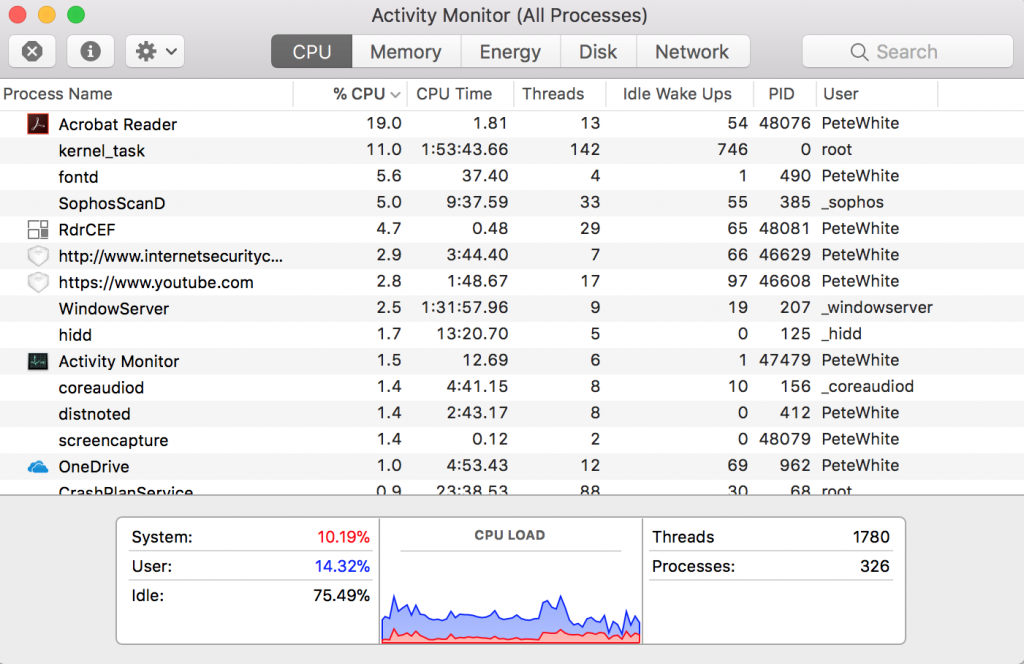
Is Adobe Acrobat Reader DC taking an unreasonable amount of the CPU over a sustained period of time?

Trying to identify the process at fault is often difficult as there isn’t a comprehensive list of all the core OS X processes (like kernel_task, fontd, WindowServer, hidd, coreaudiod). Typically when troubleshooting if a process is taking a sustained period of time to load I will simply Google it to check whether its a core OS X process, an application or malware.

Once you’ve identified the process you can then decide whether you need it or whether you should look at how to remove it.

2. Hardware

In a lot of cases, nothing is going to beat newer or better hardware. Mac’s have always been poor when it comes to upgradability and newer Mac’s haven’t made this any easier. In many cases, the components your Mac come with are the ones it will end its life with however some models allow you to change either the hard drive or the memory.

OS X and our applications love memory and the rule is simple, the more the better, if you have the option to upgrade from 2gb to 4gb or 4gb to 8gb its one of the easiest ways to see a noticeable performance increase.

Older Macs before SSDs were standard should let you replace the hard drive for a solid state drive. There are plenty of tutorials on YouTube on how to do this. The performance difference is again noticeable and its a relatively low cost way to breath some life into an older Mac.

Other upgrades such as changing processors are usually not possible or recommended due to compatibility.

3. Disk Space

As well as the physical memory (RAM) in your Mac, OS X uses virtual memory, or part of your physical disk drive. This gets cleared out at reboot and is managed automatically by the system as you use it. If you’re like me and only reboot for updates then it’s not uncommon for these files to be several gigabytes. OS X manages these files without you having to worry but it is important to ensure you have enough space left on your drive.
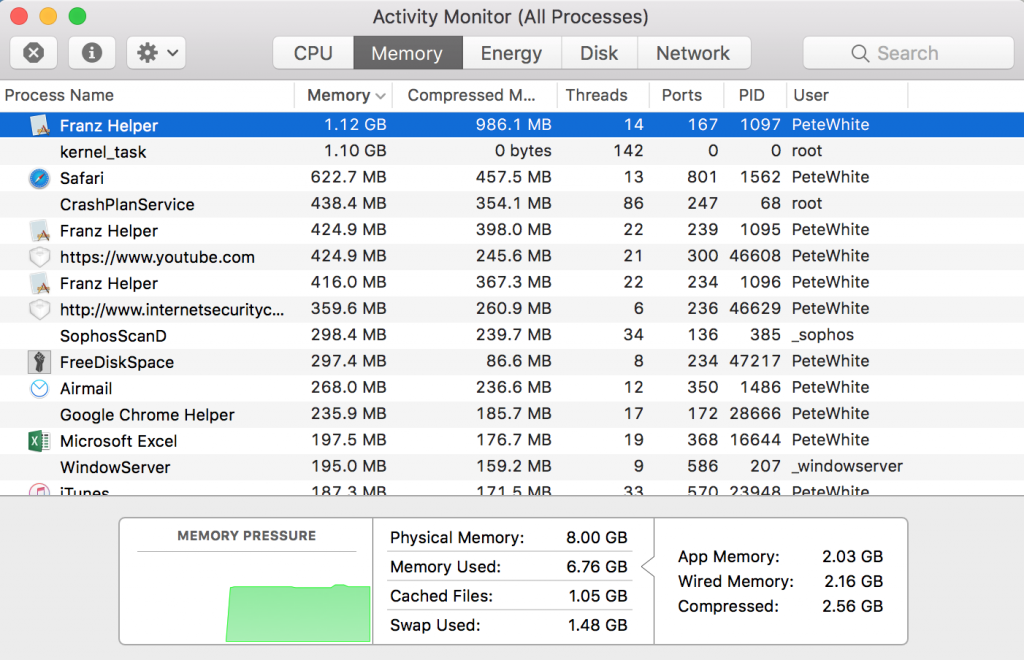
OS X memory usage after reboot and opening Safari
The memory tab of Activity Monitor shows the biggest memory users and the types of memory in use.

Quick tips for more disk space

  1. Empty Trash
  2. Clear back download items
  3. Run a disk space analyser app such as Free Disk Space 
  4. Delete odd applications or files

4. OS X Tweaks

This section concentrates on quick and simple changes you can make within OS X to help with performance.

Start up items

When installing applications they often install themselves as a ‘login item’ so that when you boot your machine they open at login. In many circumstances, there is a good reason for this, applications such as Dropbox or OneDrive open in this way so that they can synchronise any files waiting to download or upload. In some cases though the functionality of the program isn’t needed on boot.

Fortunately, OS X gives a simple interface for reviewing these applications:

  1. Open System Preferences
  2. Click Users & Groups
  3. Click the tab ‘login items’
  4. From here you can see the items you have on startup.
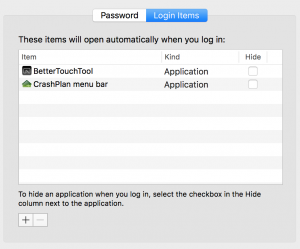
  5. To remove an item click on it then click the minus symbol.

Visual effects

Disabling some of OS X’s visual effects will make it feel a little faster, to do the following you need to open the Terminal application (found in the applications folder) :

1. Disable animations when opening and closing windows.

defaults write NSGlobalDomain NSAutomaticWindowAnimationsEnabled -bool false

2. Disable animations when opening a Quick Look window.

defaults write -g QLPanelAnimationDuration -float 0

3. Accelerated playback when adjusting the window size (Cocoa applications).

defaults write NSGlobalDomain NSWindowResizeTime -float 0.001

4. Disable animation when opening the Info window in Finder (cmd⌘ + i).

defaults write com.apple.finder DisableAllAnimations -bool true

5. Disable animations when you open an application from the Dock.

defaults write com.apple.dock launchanim -bool false

6. Make all animations faster that are used by Mission Control.

defaults write com.apple.dock expose-animation-duration -float 0.1

7. Disable the delay when you hide the Dock

defaults write com.apple.Dock autohide-delay -float 0

Reduce Finder Memory Usage

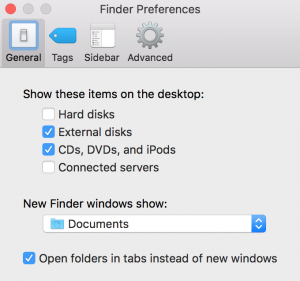
When opening finder, by default, it’s set to search for files within All My Files view. With lots of files on older Mac’s, this can slow down the opening of Finder.

  1. Open Finder
  2. Choose Preferences in the top menu
  3. Locate New Finder Window menu
  4. Now you change the default settings from “All My Files” to other more specific location, like your Documents folder. Next time you launch Finder it will automatically open in this new location.
5. Applications

I clung up to using Adobe Fireworks for years, it did everything I needed when it came to graphics editing but on my early 2015 MacBook Pro, it took a full 27 seconds to load. The reason was the way the software was written, using software development languages and libraries common in the early days of OS X.

About a year ago I switched to Acorn a modern graphics editor written specifically for newer versions of OS X, it loads on my Mac in about 2 seconds.

I hadn’t changed anything to improve performance as such but just by changing the application I had made my Mac feel significantly quicker.

There’s no hard and fast rules when it comes to finding faster applications but if there is a common application you use which is either slow to load or to use then try searching for an alternative.

In general applications made specifically for OS X (such as my example above) are quicker.

Application Updates

Updates are a tricky one when it comes to performance, for many software developers performance related improvements will come in incremental releases after the main product has shipped. However, as we reported on earlier in the year with the Meltdown/Spectre exploits any related updates could have crippling performance issues.

On the other hand, Apple has released entire versions of OSX (remember OS X 10.6 Snow Leopard and to a lesser extent OS X 10.13 High Sierra) to give performance improvements.

In general, updates function as security fixes and bug fixes rather than performance improvements.

6. Web Browsers

Clear Cache

  • Safari. Launch the browser and select ‘Safari’ from the menu bar, followed by ‘Preferences…’ In the window that appears, click the ‘Privacy’ tab and give the ‘Manage Website Data…’ button a click. Select ‘Remove All.’
  • Chrome. Launch Chrome and select ‘History’ from the menu bar, followed by ‘Show full history.’ Click the ‘Clear browsing data…’ button.


Browser Extensions

How to remove Safari extensions

  1. Launch Safari.
  2. Click Safari > Preferences in the upper menu
  3. Choose Extensions tab.
  4. Remove the extensions you don’t need

How to remove Chrome extensions

  1. Launch Chrome.
  2. Click a three-dot icon in the top-right corner.
  3. Click More tools > Extensions.
  4. This will show you all the extensions you have installed. Simply delete or disable any you no longer use or recognise.

8. Other Troubleshooting

Resetting the SMC

Resetting the SMC can fix a number of power and hardware related problems including:

  • Problems with cooling fans: Such as your the fans run at high speeds for long periods of time or your fans not working at all
  • Lighting issues: Such as your battery indicator lights not working, problems with display backlighting or keyboard backlights issues.
  • Power management issues: Such as your Mac not turning on, sleep not working, random shutdowns and reboots.
  • Battery problems: Such as your battery not charging.
  • General performance and functionality issues: Such as your Mac feeling abnormally slow despite no CPU or disk usage or if your external ports are not working, airport and Bluetooth not working.

To reset on Mac desktops:

  1. Shut down your Mac.
  2. Unplug the power cord.
  3. Wait at least 15 seconds.
  4. Plug the power cord back in.
  5. Wait 5 seconds, then press the power button again to turn on your Mac.

To reset on Mac laptops:

  1. Shut down your Mac.
  2. Press Shift-Control-Option on the left side of the built-in keyboard, then press the power button at the same time. Hold these keys and the power button for 10 seconds.
    If you have a MacBook Pro with Touch ID, the Touch ID button is also the power button.
  3. Release all keys.
  4. Press the power button again to turn on your Mac.

9. Good Practice

These tips aren’t necessarily going to speed OS X up but will make the day to day usage of your Mac easier and hence feel quicker to use.

Keeping the downloads folder clean

Since the introduction of High Sierra, when you’ve downloaded a new installation file, you will be prompted to send the file to the trash. This doesn’t apply to other files such as PDFs and images so its good practice to clear back this folder once in a while.

Removing Unused Apps

In most cases removing an unused app is as simple as locating it in finder and dragging it to the trash.

10. Final Note

Hopefully, the above tips will help keep your Mac feeling fast and current and remember to try to restart once in a while!

*Google analytics – 492,193 page views as of 6th March 2018

Be the first to write a comment.

Leave a Reply

Your email address will not be published. Required fields are marked *

Apple

Apple beefing up child safety as more governments enact, explore social media bans

Breadcrumb Trail Links Home News World Share this Story : National Post Copy Link Email X Reddit Pinterest LinkedIn Tumblr Apple beefing up child safety as more governments enact, explore social media bans Tech companies are under pressure to limit children’s exposure to social media, which has been linked to mental health risks Author of

Apple beefing up child safety as more governments enact, explore social media bans

Tech companies are under pressure to limit children’s exposure to social media, which has been linked to mental health risks

Article content

Apple Inc. is expanding tools for parents to protect children online, a move that comes as governments around the world increasingly ban social media for young people.

Article content

The iPhone and iPad maker at its Worldwide Developers Conference Monday previewed new features that will let parents better control on devices when kids can use apps, what content they can access and with whom they can communicate.

Article content
Article content

Story continues below

Article content

Tech companies are under growing pressure to limit children’s exposure to social media, which some psychologists have linked to mental health risks, including cyberbullying, eating disorders and suicide. Apple already lets parents create special accounts for children, required for those under 13 years old and available for those up to 18.

Article content
Article content

The updates are designed to help families “thoughtfully establish age-based protections and develop healthy digital habits,” Sumbul Desai, Apple’s vice president of health and fitness, said on the Cupertino, California-based company’s website.

Article content

Beginning with software updates this fall, parents will be able to use children’s account features to pick which apps they can use and control which websites they can view, for example.

Article content

Australia in December became the world’s first democracy to force the likes of Meta Platforms Inc., TikTok, and Snap Inc. to kick under-16s off their platforms. The movement has since spread globally, with Indonesia, parts of India, the UK and several European countries implementing or discussing similar restrictions.

Article content

Story continues below

Article content

Jury verdicts in the U.S. in recent months against some of the services have increased public discussion of social media’s harms.

Article content
Read More
  1. Prime Minister Mark Carney with his wife Diana Fox Carney during a visit to the Vector Institute at the Schwartz Reisman Innovation Campus in Toronto, on Thursday, June 4, 2src26.
    Carney government to ban social media for kids younger than 16, but will allow exemptions
  2. A teenager holds a mobile phone displaying a message from social media platform Instagram after the account was locked for age verification in Sydney on December 9, 2src25.
    Poll finds 90% in favour of social media age ban, while advocates urge action for online harms
  3. Advertisement 1
    Story continues below
Article content

Australian Prime Minister Anthony Albanese said Tuesday Apple Chief Executive Officer Tim Cook called him to discuss the new safety controls.

Article content

“Mr. Cook told me these changes are in part inspired by Australia’s world-leading social media age ban, as well as the continued research Apple is undertaking into the impact of social media on kids,” Albanese said in a statement.

Article content

Apple didn’t immediately respond to a request for comment.

Article content

Our website is the place for the latest breaking news, exclusive scoops, longreads and provocative commentary. Please bookmark nationalpost.com and sign up for our newsletters here.

Article content
Article content

Apple Inc. is expanding tools for parents to protect children online, a move that comes as governments around the world increasingly ban social media for young people.

Article content

The iPhone and iPad maker at its Worldwide Developers Conference Monday previewed new features that will let parents better control on devices when kids can use apps, what content they can access and with whom they can communicate.

Article content
Article content

Story continues below

Article content

Tech companies are under growing pressure to limit children’s exposure to social media, which some psychologists have linked to mental health risks, including cyberbullying, eating disorders and suicide. Apple already lets parents create special accounts for children, required for those under 13 years old and available for those up to 18.

Article content
Article content

The updates are designed to help families “thoughtfully establish age-based protections and develop healthy digital habits,” Sumbul Desai, Apple’s vice president of health and fitness, said on the Cupertino, California-based company’s website.

Article content

Beginning with software updates this fall, parents will be able to use children’s account features to pick which apps they can use and control which websites they can view, for example.

Article content

Australia in December became the world’s first democracy to force the likes of Meta Platforms Inc., TikTok, and Snap Inc. to kick under-16s off their platforms. The movement has since spread globally, with Indonesia, parts of India, the UK and several European countries implementing or discussing similar restrictions.

Article content

Story continues below

Article content

Jury verdicts in the U.S. in recent months against some of the services have increased public discussion of social media’s harms.

Article content
Read More
  1. Prime Minister Mark Carney with his wife Diana Fox Carney during a visit to the Vector Institute at the Schwartz Reisman Innovation Campus in Toronto, on Thursday, June 4, 2src26.
    Carney government to ban social media for kids younger than 16, but will allow exemptions
  2. A teenager holds a mobile phone displaying a message from social media platform Instagram after the account was locked for age verification in Sydney on December 9, 2src25.
    Poll finds 90% in favour of social media age ban, while advocates urge action for online harms
  3. Advertisement 1
    Story continues below
Article content

Australian Prime Minister Anthony Albanese said Tuesday Apple Chief Executive Officer Tim Cook called him to discuss the new safety controls.

Article content

“Mr. Cook told me these changes are in part inspired by Australia’s world-leading social media age ban, as well as the continued research Apple is undertaking into the impact of social media on kids,” Albanese said in a statement.

Article content

Apple didn’t immediately respond to a request for comment.

Article content

Our website is the place for the latest breaking news, exclusive scoops, longreads and provocative commentary. Please bookmark nationalpost.com and sign up for our newsletters here.

Article content
Comments
You must be logged in to join the discussion or read more comments.
Create an AccountSign in
Join the Conversation

Postmedia is committed to maintaining a lively but civil forum for discussion. Please keep comments relevant and respectful. Comments may take up to an hour to appear on the site. You will receive an email if there is a reply to your comment, an update to a thread you follow or if a user you follow comments. Visit our Community Guidelines for more information.

Latest from Shopping Essentials
  1. Where to find the most unique golfing experiences in Canada

    This country is blessed with memorable public golf courses from coast to coast

    15 minutes ago Travel
    Dundarave is one of the most unique golf courses in Canada.
  2. These islands were just named the best in Canada — here’s how to plan a summer trip

    West and East Coast islands praised by Travel + Leisure offer pristine beaches and tons of charm

    50 minutes ago Travel
    A view from a hill overlooking Cox Bay in Tofino, named one of the best islands in Canada by Travel + Leisure.
  3. I just discovered Amazon Canada’s newest feature by accident and it’s a game-changer

    Available exclusively to Prime Members

    6 hours ago Lifestyle
    Read More
Continue Reading
Apple

The Apple Watch Series 11 Drops to $238 During the Early Amazon Resale Prime Day Sale

Apple Watch prices have dropped for Amazon Prime Day. Starting today, most colors and styles start at $279 for the 42mm size and $309 for the 46mm size. That’s the lowest price I’ve ever seen by $20 and currently $120 cheaper than buying directly from the Apple Store. The Series 11 is Apple’s newest model.

Apple Watch prices have dropped for Amazon Prime Day. Starting today, most colors and styles start at $279 for the 42mm size and $309 for the 46mm size. That’s the lowest price I’ve ever seen by $20 and currently $120 cheaper than buying directly from the Apple Store. The Series 11 is Apple’s newest model. The Series 12 is expected to be announced sometime in September, but it will probably retail for $399 or more and come with minor incremental upgrades.

Apple Watch Series 11 Starting at $279 for Prime Day

Apple Watch Series 11 [GPS 42mm]

Apple Watch Series 11 [GPS 42mm]

$399.00 save 30%

$279.00 at Amazon

Apple Watch Series 11 [GPS 46mm]

Apple Watch Series 11 [GPS 46mm]

$429.00 save 28%

$309.00 at Amazon

The Apple Watch Series 11 is the best smartwatch for most iOS users. It’s stylish, boasts excellent build quality, and seamlessly integrates with your iPhone. It’s loaded with tons of practical health and fitness features, including activity tracking and heart rate monitoring. New to the Apple Watch 11th generation model specifically are (1) the Apple Intelligence powered “Workout Buddy” that motivates you during exercise, (2) hypertension notifications, and (3) a sleep score that measures the quality of your sleep. The biggest hardware updates include a brighter and more scratch resistant display and 33% longer battery life.

Can you use an Apple Watch with Android phones?

Although it’s technically possible to use an Apple Watch with an Android phone, we wouldn’t recommend it. Apple made it so that a lot of the functionality of the Apple Watch requires a smartphone with an iOS operating system. There are some workarounds to implement some of its features, but for the average person, the hassle is not worth it. If you’re absolutely intent on getting an Apple Watch, then getting an iPhone first would be the best option.

How to Follow IGN Deals Recommendations

The IGN Deals team has over 30 years of combined experience finding the best discounts and preorders available online. If you want the latest updates from our trusted team, here’s how to follow our coverage:

  • Sign up for our IGN Deals Newsletter
  • Set IGN as a preferred source in Google
  • Shop on our Amazon Storefront
  • Follow us on social media
    • IGN Finds on X
    • IGN Finds on Instagram
    • IGN Finds on

!–>!–>!–>!–>!–>!–>
Read More

Continue Reading
Apple

Desperate Housewives Alum Marcia Cross Shares Rare Selfie

Marcia Cross is giving desperate fans a rare apple. While the Desperate Housewives alum—who starred as Bree Van de Kamp on the hit ABC series—often keeps her social media focused on her career and activism, she shared a close look into her traveling style in a rare selfie. In a May 28 Instagram post, Marcia

Marcia Cross is giving desperate fans a rare apple. While the Desperate Housewives alum—who starred as Bree Van de Kamp on the hit ABC series—often keeps her social media focused on her career and activism, she shared a close look into her traveling style in a rare selfie. In a May 28 Instagram post, Marcia
Read More

Continue Reading
Apple

Daily Market Update: Bitcoin Holds $77K as S&P 500 and Nasdaq Hit Record Highs

TLDR Bitcoin climbed back above $77,000, up 1.8%, after pulling back to $75,000 earlier this week The S&P 500 closed above 7,200 for the first time ever; the Dow surged over 790 points Apple beat earnings expectations, with strong iPhone sales and growth in China boosting sentiment Geopolitical risk from a potential U.S.-Iran military escalation

TLDR Bitcoin climbed back above $77,000, up 1.8%, after pulling back to $75,000 earlier this week The S&P 500 closed above 7,200 for the first time ever; the Dow surged over 790 points Apple beat earnings expectations, with strong iPhone sales and growth in China boosting sentiment Geopolitical risk from a potential U.S.-Iran military escalation […]
The post Daily Market Update: Bitcoin Holds $77K as S&P 500 and Nasdaq Hit Record Highs appeared first on CoinCentral…
Read More

Continue Reading